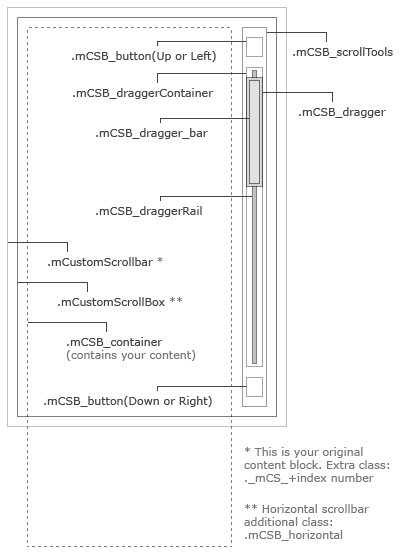
jquery custom content scroller

Custom scrollbar plugin utilizing jquery UI that’s fully customizable with CSS. It features vertical/horizontal scrolling, mouse-wheel support (via Brandon Aaron jquery mouse-wheel plugin), scroll easing and adjustable scrollbar height/width.

malihu custom scrollbar plugin

DEMO DOWNLOAD

Changelog

14/12/2011
Updated demo and download archive with the updated mousewheel plugin (version 3.0.6), in order for mousewheel to work with jquery 1.7.

13/04/2011
Fixed a bug regarding pressing-dragging-releasing scroll buttons.

23/02/2011
Automatically setting content width for horizontal scrollers is no longer calculated via javascript. Instead of using jQuery .each() or for statements, the width is now set by adding an additional div (.horWrapper) that wraps content and by setting the display of .container div to inline, thus expanding its width automatically (check the updated css file for details).

How to use it

In order to implement the plugin, you first need to insert inside the head tag of your document the jquery.min.js and jquery-ui.min.js (both loaded from Google), the jquery.easing.1.3.js (the plugin that handles animation easing), jquery.mousewheel.min.js (to support mouse-wheel functionality) and the jquery.mCustomScrollbar.css which is the file where you can style your content and scrollbars.

<link href="jquery.mCustomScrollbar.css" rel="stylesheet" type="text/css" />
<script src="http://ajax.googleapis.com/ajax/libs/jquery/1.4/jquery.min.js" type="text/javascript"></script>
<script src="http://ajax.googleapis.com/ajax/libs/jqueryui/1.8/jquery-ui.min.js" type="text/javascript"></script>
<script src="jquery.easing.1.3.js" type="text/javascript"></script>
<script src="jquery.mousewheel.min.js" type="text/javascript"></script>

Next you’ll need to insert the markup of the content blocks you want to have custom scrollbars inside the body tag. The structure of the markup is exactly the same for every content block except the first div which should have a unique id (in this example: mcs_container).

<p>Your long content goes here...</p>

Keep the markup structure exactly as shown above, placing your content inside the div that has the class name content. In order to have multiple content blocks with custom scrollbars on a single document, you use the exact same markup with a unique id for each block (e.g. mcs_container, mcs2_container, mcs3_container etc.).

The markup for horizontal scrollers needs an additional div with class name horWrapper that wraps the .container div. This is necessary in order to set the total width of contents automatically, without the need to insert it by hand in css or make complicated calculations with javascript.

<p>Your long content goes here...</p>

To add the additional scrollbar buttons, you need to insert two additional anchor tags inside mcs_container div, with class names scrollUpBtn and scrollDownBtn:

<p>Your long content goes here...</p>
<div class="dragger"></div></div> </div> <!-- scroll buttons --> <a class="scrollUpBtn" href="#"></a> <a class="scrollDownBtn" href="#"></a>

An extra feature suggested and provided by isHristov is to add a few lines of CSS right after your content markup, in order to help users that have javascript disabled scroll the content:

<noscript>
	<style type="text/css">
		#mcs_container .customScrollBox{overflow:auto;}
		#mcs_container .dragger_container{display:none;}
	</style>
</noscript>

The final step is to include the actual custom scrollbar plugin (jquery.mCustomScrollbar.js) and the function that calls and configures the scrollbar(s) at the end of your document, just before the closing body tag.

<script>
$(window).load(function() {
	$("#mcs_container").mCustomScrollbar("vertical",400,"easeOutCirc",1.05,"auto","yes","yes",10);
});
</script>
<script src="jquery.mCustomScrollbar.js" type="text/javascript"></script>

You can configure each content block scrollbar by setting the parameters of the function call:

  1. The scroll type (“vertical” or “horizontal”)
  2. The scroll easing amount (e.g. 400 for normal easing, 0 for no easing etc.)
  3. The scroll easing type
  4. The extra bottom scrolling space (applies to vertical scroll type only)
  5. Set the scrollbar height/width adjustment (“auto” for adjustable scrollbar height/width analogous to content length or “fixed” for fixed dimensions)
  6. Set mouse-wheel support (“yes” or “no”)
  7. Scrolling via buttons support (“yes” or “no”)
  8. Buttons scrolling speed (an integer between 1 and 20, with 1 indicating the slowest scroll speed)

Multiple scrollers

To set multiple content blocks with custom scrollbars on a single page, give them a unique id (keeping the exact markup) and add a function call for each one. For example:

<script>
$(window).load(function() {
	$("#mcs_container").mCustomScrollbar("vertical",400,"easeOutCirc",1.05,"auto","yes","yes",10);
	$("#mcs2_container").mCustomScrollbar("vertical",0,"easeOutCirc",1.05,"fixed","yes","no",0);
	$("#mcs3_container").mCustomScrollbar("vertical",900,"easeOutCirc",1.25,"auto","no","no",0);
});
</script>

You can style each scroller separately in jquery.mCustomScrollbar.css, since styles are assigned only to the element with the original id (see the .css file inside the jquery_custom_scroller.zip).

Scrolling long content

There’s a bug in jquery.min.js that resets to 0, an animate value greater than 9999 pixels. This bug will affect the scrollbar if content width or height is equal or greater than 10000 pixels, resulting a scrolling jerk. This annoying bug is going to be fixed on a future release of the library. Until then, we need to come up with a temporary solution and since editing jquery.min.js is not the best of practices, we’ll overwrite the jquery function containing the buggy code ;)
Insert the following code below the window load function:

<script>
/* function to fix the -10000 pixel limit of jquery.animate */
$.fx.prototype.cur = function(){
    if ( this.elem[this.prop] != null && (!this.elem.style || this.elem.style[this.prop] == null) ) {
      return this.elem[ this.prop ];
    }
    var r = parseFloat( jQuery.css( this.elem, this.prop ) );
    return typeof r == 'undefined' ? 0 : r;
}
</script>

Dynamically loaded content

To load new content dynamically inside scroller(s) (via .load(), ajax requests etc.), you need to call (or re-call) mCustomScrollbar function after new content is loaded. For example:

$("#mcs_container .content").load("new.html", function(){
$("#mcs_container").mCustomScrollbar("vertical",400,"easeOutCirc",1.05,"auto","yes","yes",10);
});

When you have multiple content scrollers on a single page that load new content dynamically, it’s better to create another function that calls all scrollers and call it on window.load as well as each time new content is loaded. The demo includes this functionality, so you can check and grab the code.

Hiding content scrollers

If you want to have the scroller initially hidden, you need to hide it after calling the mCustomScrollbar function. This is important, in order for the script to calculate content width or height correctly.

Mousewheel scrolling with Safari on mac OS

Mousewheel scrolling with Safari browser on OSX might be extremely fast thus a bit unusable (blame the vendor!). I have uploaded a modified jquery.mCustomScrollbar.js at http://manos.malihu.gr/tuts/jquery_custom_scroller_js_osxsafari.zip that checks for mac OS and Safari browser to lower mousewheel delta. I haven’t implement the modification in the original plugin cause I don’t really fancy coding for specific operating systems or browsers.

Mobile browsers and touch support

Simon Dau extended the plugin with touch support for mobile browsers and touch-screen devices on Kartogram blog. Big thanks to Simon!

If you need assistance with the script, please make sure you read the comments section (at the moment there are over 500 comments), as many users have answered questions and posted helpful bits of code ;)

Feel free to use the plugin wherever and however you like. Enjoy :)

Digg This
Reddit This
Stumble Now!
Bookmark this on Delicious

Related posts:

  1. Flash background with html content
This entry was posted in jQuery/Javascript and tagged , , , . Bookmark the permalink. Post a comment or leave a trackback: Trackback URL.

609 Comments

  1. Posted August 2, 2010 at 23:01 | Permalink

    This is very nice, I think I will use it on a commercial project if I am allowed to :-)

    • admin
      Posted August 3, 2010 at 00:10 | Permalink

      You are allowed to use it anywhere/anyhow you like. If you eventually use it on a project of yours it would be cool to let me know :) cheers

      • reese
        Posted January 12, 2011 at 22:10 | Permalink

        Hi, nice plugin. But is it possible to use a div with a scrollbar (let’s say horizontal) inside a div with a vertical scrollbar?
        I don’t mean two scrollbars for the same content, but for two different contents.
        Something like this http://img692.imageshack.us/img692/7899/screenshot001mh.png

        Thanks

      • malihu
        Posted January 13, 2011 at 01:59 | Permalink

        @reese

        It’s not possible as it is (out-of-the-box). It should be possible but honestly I can’t tell how much work it needs to be done in order to do it. Unfortunately, at the moment I work on so many things, I can’t tell when I’ll be able to try it.

      • Sim Hua Soon
        Posted May 17, 2011 at 12:59 | Permalink

        Hi,

        It’s a great plugin. I have adapted it into a Confluence extension. Check it out at Akeles Space Lister Extension.

        Thank you

      • Posted January 28, 2012 at 20:50 | Permalink

        Hi there,

        Very good plugin! Compliments!
        If you don’t object, I’d like to use it in my new site.

        One question though…
        I use a later jquery version and it appears that the scroll only works in Firefox…
        In all other browsers, the scrollbar moves alright, but the content doesn’t…
        When I use your link to the Google api jquery 1.4.4 it works fine.

        Any idea why this is?
        Thanks!

        Ward

  2. Posted August 6, 2010 at 21:18 | Permalink

    LOOOOOVE the easing animation on the mouse wheel. Very very useful!!

  3. Posted August 17, 2010 at 11:14 | Permalink

    Been looking for something like this for ages, amazing.

  4. Posted September 3, 2010 at 00:09 | Permalink

    Cool, just started a new project today and this little beauty here will come in very very handy :)

    You will get a link from me soon !

  5. Posted September 6, 2010 at 09:34 | Permalink

    Really nice and very useful content. Great work buddy, keep it up

  6. Posted September 10, 2010 at 09:57 | Permalink

    Thank you so much for this component, i really enjoy it!
    i’m searching this days for something like that, and i have found just it here ;)

    Just one question: the mouse scrolling doesn’t work, is there some problems with css absolute position, or other css trouble that make it unwork?

    thank you again

    • malihu
      Posted September 11, 2010 at 03:29 | Permalink

      Hello,
      It should work fine with position:absolute tho I’d have to see the actual code to see if there are any problems.

  7. Posted September 14, 2010 at 13:37 | Permalink

    Looks very nice indeed! Any plans to make a plugin out of this code? Also the scrollTo method would be really useful, as well as horizontal scroller, min bar height etc. (take look at jScrollPane). In fact I believe that with this component as a plugin you and your site could become famous :-) . Please do not forget the license, because people get confused as you can see in the above comments… PS: all your other examples are great too!

    • malihu
      Posted September 15, 2010 at 01:01 | Permalink

      Hi Vadim, thanks for your comments :)

      Unfortunately I don’t have much time to make a plugin at the moment but I hope I’ll find some time in the future. I was thinking about horizontal scrolling too so I might give a go ;) The reason for not using scrollTo is because I wanted to use some easing with the scrolling, so I went with animate. I also feel a bit more familiar with animate cause I develop a lot with actionscript.

      • Posted September 15, 2010 at 04:04 | Permalink

        What I meant by scrollTo was the ability to scroll to a certain selector (inside the container) with some method provided by your potential plugin. So animate() can be used for it too…

      • malihu
        Posted September 16, 2010 at 01:55 | Permalink

        I see. I might give it a go if I make a plugin out of it. Thanks for the suggestion :)

  8. Dave
    Posted September 20, 2010 at 13:31 | Permalink

    Hi,
    This is a neat demo, however it’s basically unusable on my Mac thanks to the inertial scrolling already built into OS X. Scrolling using either the built-in trackpad or the Magic mouse causes the content to scroll instantly to the top or bottom at the slightest touch. :(

    • malihu
      Posted September 20, 2010 at 13:41 | Permalink

      Thanks for the input Dave
      Unfortunately I didn’t checked this script on a mac. I’ll check it and see if there’s anything I can do to fix it.

    • dumper
      Posted December 29, 2010 at 22:11 | Permalink

      i can diagnose your problem. its that your using a mac…

      • no
        Posted February 1, 2012 at 12:35 | Permalink

        HAH HAH HAH HAH GOOD ONE

        hang yourself.

    • malihu
      Posted February 16, 2011 at 14:33 | Permalink

      Hello again!
      Inside jquery.mCustomScrollbar.js find the line var vel = Math.abs(delta*10); and change 10 to a lower number (e.g. 1).
      That should help.

  9. Posted October 7, 2010 at 16:40 | Permalink

    Man, your ideas come from a different dimension… Great post, well done!

  10. Posted October 22, 2010 at 00:45 | Permalink

    Hi, man! Your work is pretty amazing and I trully appreciate it!
    I was thinking in implementing this script in one of my projects so I wanted to see if it’s okay with you.

    However, while testing, I saw that the scrollbox dies in case Javascript is disabled so I’ve made a few changes to make it degrade in case of this scenario.
    You can update yours if you like. :-)

    The CSS:

    Change:
    "#customScrollBox{position:relative; height:600px; overflow:hidden;}"
    to
    "#customScrollBox{position:relative; height:600px; overflow:auto;}"
    //tp make sure the default look will be with scroll if necessary

    Add "display: none;" to
    #dragger_container{position:relative; width:0px; height:580px; float:left; margin:10px 0 0 10px; border-left:1px solid #000; border-right:1px solid #555;}
    //to make sure the dragger_container is not shown by default.

    The JS code:
    After
    if($customScrollBox_container.height()>visibleHeight){
    (line 11), add the following:

    $customScrollBox.css("overflow", "hidden"); $dragger_container.css("display", "block");
    //in case Javascript is enabled this script is executed, default scrollbar is hidden and custom dragger_container is displayed.

    P.S. Your blog is awesome! I lost electricity while writing this and when I came back later the comment I was writing was still here! Genius! LocalStorage I guess?

    • malihu
      Posted October 22, 2010 at 01:55 | Permalink

      Amazing mate, thanks a lot :)
      I’ll update the post as soon as possible!

      Edit: done.

    • Dave
      Posted June 30, 2011 at 04:23 | Permalink

      I’ve just started using this plugin (it’s awesome!) however, I’m finding that sometimes it doesn’t scroll to the bottom of the content. It may scroll 80% down then the scroller reaches the end, however the bottom of the content is not visible.

      Any ideas what could possibly be causing this? Thank you!

  11. Posted October 22, 2010 at 11:55 | Permalink

    Perfect! Thanks a lot!!!

  12. nyanshiki
    Posted October 22, 2010 at 16:25 | Permalink

    Excellent, but how to fix bug when using customized colors and clicking dragger, it changes back to default colors?

    • malihu
      Posted October 22, 2010 at 16:40 | Permalink

      Find functions DraggerOver() and DraggerOut() inside script and change their color values for foreground, background, borders etc.

  13. Posted October 30, 2010 at 15:19 | Permalink

    I am looking for same like scroller, unfortunately i found this one.
    Thanks Dear.

    • dumper
      Posted December 29, 2010 at 22:14 | Permalink

      uh.. what?

  14. Posted November 4, 2010 at 19:04 | Permalink

    I love It!!!! too cool!!!! thks

  15. Posted November 12, 2010 at 12:42 | Permalink

    Hello again. :)
    I wasn’t very happy (at all) with my previous solution to the javascript-disabled problem so I come up with a new one. The problem with the previous fix was that in case javascript is enabled then for a few ms you would see the ugly default scroller and then the new scroller would be loaded. We definitely don’t want that.

    The new solution basically is to return to your original code (display the nice scroller by default) and add just a tiny fix ONLY in case javascript is disabled with noscript tag. Step by step:


    Change:
    "#customScrollBox{position:relative; height:600px; overflow:auto;}"
    to
    "#customScrollBox{position:relative; height:600px; overflow:hidden;}"
    //return to your original code

    Remove
    "display: none;"
    from
    #dragger_container{position:relative; width:0px; height:580px; float:left; margin:10px 0 0 10px; border-left:1px solid #000; border-right:1px solid #555; "display: none;}
    //same here

    Remove the following lines from the JS code:
    $customScrollBox.css("overflow", "hidden");
    $dragger_container.css("display", "block");
    //same here

    So now we have your original code before my fist suggestion. The only thing we must add is:

    #customScrollBox { overflow:auto; }
    #dragger_container { display:none; }

    //this should go right after your markup (after you close all those divs for the scroller). This code adds the two properties to #customScrollBox and #dragger_container to display the standart and ugly scroller in case of disabled javascript

    I think this solution is better. :)

  16. Posted November 12, 2010 at 12:46 | Permalink

    Ooops, that’s bad. The code that must be added didn’t pass the validation.
    New try. The code should be:


    (remove hyphen)
    #customScrollBox { overflow:auto; }
    #dragger_container { display:none; }
    (remove hyphen)

  17. Posted November 12, 2010 at 12:52 | Permalink

    Okay, you can see the code here. It’s in txt file. :)

    • Posted November 12, 2010 at 21:01 | Permalink

      You can update my first post from today and delete the other crap (including this one). :-)

      • malihu
        Posted November 14, 2010 at 19:22 | Permalink

        Thanks a lot! Will do :)

        Edit: Done! Code, post, demo and download files are updated. Thanks a lot for your input isHristov.

  18. Posted November 15, 2010 at 23:50 | Permalink

    You are welcome! :-)
    I can show you the project where I implemented this one (and one more of your scripts) in a few weeks if you are interested.

    • malihu
      Posted November 16, 2010 at 01:16 | Permalink

      Of course I am :)

  19. Posted November 16, 2010 at 16:37 | Permalink

    Its a cool scroll bar.
    I am having a little trouble with it displaying on firefox.
    IE, Chrome is fine.
    FF 2.6 has a huge gap down below.
    Check out http://www.khaosok-accommodation.com/activities.html for an example.

    How can I fix this?

    It seems to put the height of the whole text on .container, I have tried adding height to it which fixes the height problem but then the scroll bar goes missing.

    Thanks

    • malihu
      Posted November 18, 2010 at 10:21 | Permalink

      Hello Don,

      I normally do not check the scripts on old browsers (such as firefox 2, ie6 etc.) as they have varius implementation bugs and issues with css and javascript.

  20. Posted November 23, 2010 at 16:24 | Permalink

    oops,
    I meant 3.6, does not matter too much anyway if there is not fix for it

  21. jesper Møller
    Posted December 7, 2010 at 13:55 | Permalink

    IS it posible to use the Script externaly, insted fo placing the script at the bottom of the page?
    is yes. How ?

    • malihu
      Posted December 12, 2010 at 15:46 | Permalink

      Yes of course. Make a new .js file and copy the script content inside it. Give it a filename (e.g. jquery.customscrollbar.js) and then load it in your document (before the closing body tag) like any other javascript files.

  22. Markos
    Posted December 10, 2010 at 12:48 | Permalink

    Hey, thanks! Really helpful!
    Used it at: http://www.mariatheodoradimaki.com

  23. Toz
    Posted December 23, 2010 at 14:06 | Permalink

    Love it.

    But could you please help? I don’t know where to start if I wanna modify this to horizontal bar.

    • malihu
      Posted December 23, 2010 at 14:50 | Permalink

      Hi,
      I’m currently creating a plugin out of this script, so if you can wait a couple of days, you’ll be able to implement vertical as well as horizontal scrollbars easily ;)

      Edit: done

      • Toz
        Posted December 24, 2010 at 04:40 | Permalink

        That is awesome!

    • malihu
      Posted December 25, 2010 at 04:36 | Permalink

      Hello again Toz,
      Just finished the plugin. Please re-download the files and check the post for information on how to implement the plugin.

      • Toz
        Posted December 25, 2010 at 08:21 | Permalink

        This is truly awesome. Thank you very much for letting me know.
        ;)

      • Fred
        Posted May 23, 2011 at 21:44 | Permalink

        I’m using the vertical scroll bar with the buttons.
        I love it but I’m trying to set a fixed scroll movement for the buttons.
        Lets say that I want to scroll with each click, 50px down. Can this be done? How?
        Thank you!

  24. Posted December 25, 2010 at 21:28 | Permalink
  25. Posted December 27, 2010 at 19:52 | Permalink

    would this also work to change the browser’s scrollbar?
    like in this website.

    • malihu
      Posted December 27, 2010 at 20:54 | Permalink

      Not really. It could only work if you place your entire content inside div.content and set the body, mcs_container etc. display to “fixed” and width to “100%” in your stylesheet.

      • Posted December 30, 2010 at 03:55 | Permalink

        figured :/
        any idea how this was made?
        i tried looking at the source but found nothing.
        and tried google, that’s how i came across this.

        thanks

  26. Posted December 28, 2010 at 07:01 | Permalink

    OMG..!!

    This is the thing I was waiting for…!!
    That’s really amazing… Thank you very much for this.

    Just one thing, All the JS required for this became very heavy in size(293 kbs) including the CSS.

    I there any way to make this less in size…

    Please reply.

    Again thank you very much for this…….!!

    • malihu
      Posted December 28, 2010 at 15:12 | Permalink

      Hello Ashish,

      Thank you for your comments :)

      The plugin (jquery.mCustomScrollbar.js) is about 8kb in size (un-minified). The rest of the files (except jquery itself) needed to implement it are:

      The CSS (jquery.mCustomScrollbar.css). The one I created for the demo is little over 7kb and consists 5 scrollbars.

      The jquery.easing.1.3.js, which is also 7kb.

      And the jquery.mousewheel.min.js (about 1kb).

      That’s an additional 23-25kb plus the jquery itself (which is better loaded from Google, so it’s always cached). Everything else depends on the markup and images (if any).

    • Posted March 3, 2011 at 23:26 | Permalink

      True but not true if you search a bit. On the Jquery Ui’s site you can create a custom version of the file with only what you need.

      I just needed the minimum for the scroll in itself which is: Core, Widget, Mouse and Draggable. This gave me a 28kb file.

      I even went further with a javascript compression algorithm and got a 26kb file.

  27. Posted December 28, 2010 at 09:17 | Permalink

    Nice article.. realy great stuffs..

  28. Posted December 29, 2010 at 15:41 | Permalink

    Looks great. I think it could be a little better if the click target for hitting a specific point on the scrollbar (anywhere not on the drag anchor) was wider than 1px. Seems awfully hard to hit.

    • malihu
      Posted December 29, 2010 at 19:09 | Permalink

      Hi Zach,
      Yes 1-2px is indeed hard to hit… With some padding or transparent images as background it’s easily fixed. Thanks for your comment :)

  29. Posted December 30, 2010 at 07:10 | Permalink

    Excellent jquery for website. thanks for code support.

  30. Posted December 30, 2010 at 23:01 | Permalink

    Nice jquery content sliders. Its nice that you can style it to match the color theme. Will be using these.

  31. Posted December 31, 2010 at 02:04 | Permalink

    Really great lessons on your site:) Thanks a lot mate.

    Surdo

  32. Posted December 31, 2010 at 03:58 | Permalink

    I love this plugin. It’s perfect for both mobile and desktop applications.

  33. Posted January 1, 2011 at 01:24 | Permalink

    Wouldn’t it be better to pass parameters as an object?


    $("element").mCustomScrollbar({
    scrollType : 'vertical',
    easingAmount : 400,
    easingType : 'easeOutCirc',
    bottomSpace : 1.05 ,
    heightWidthAdjustment : 'auto',
    enableMouseWheel : true
    });

    • malihu
      Posted January 1, 2011 at 02:02 | Permalink

      Well, generally yes. Passing parameters as objects is the more error-proof method (not much difference other than that). The only reason I didn’t used it, is because it would clutter the code, especially when you call many scrollers. Thanks for pointing it :)

  34. Posted January 1, 2011 at 03:18 | Permalink

    This should work perfectly with what I’m creating. Thanks, it all works great!

  35. Bes
    Posted January 2, 2011 at 17:29 | Permalink

    Pardon me as I’m a jQuery newbie, but is there a way to make the content scroll automatically along with the scrollbar similar to the “Most Popular on HuffPost” section on http://www.huffingtonpost.com?

    • malihu
      Posted January 3, 2011 at 02:33 | Permalink

      An automatic content scroll can be done by animating the dragger with a simple function on page load.

      The huffingtonpost.com “most popular” content is a bit different as it probably loads new content dynamically via ajax and then re-runs the scrollbar function. The same can be done with this scroller.

      What exactly you need?

      • Bes
        Posted January 4, 2011 at 12:39 | Permalink

        I don’t need dynamic content to load like Huffington Post, but a similar type of functionality where it scrolls automatically every few seconds but the user can also use a scrollbar to go through as well. Your code has a nice scrollbar design and fuctionality, I’m just wondering if we can easily make it scroll through the list automatically at regular timed intervals.

      • Tina
        Posted October 26, 2011 at 22:49 | Permalink

        Hi,
        I’ve used your scroller before and it’s really lovely, but now I’d like it to start scrolling automatically when the page loads. Your reply to Bes seems as close as the discussion gets to this, but unfortunately I don’t know enough jquery to know what you really mean by “animating the dragger with a simple function on page load. ”

        Just for us non-scripters, how do you do that? I have no idea even where to begin with that? I would be soooo grateful if you or someone who understands this better could spell it out for us ignorants :)

  36. Posted January 4, 2011 at 03:02 | Permalink

    fantastic scroller!

    i’ve just set it up with a row of thumbnails, whose horizontal overflow: auto solution was an eyesore against the dark red design (especially the bright blue mac scroller, which i usually love!). i’m wondering though- is there any way to set the .container width to auto-detect its content (rather than set a width in the styles)? when my client adds or removes an image from the set, the total width of the thumbnails will change…

    • Posted January 4, 2011 at 04:20 | Permalink

      for instance, your thumbnail scroller doesn’t require the width of the container to be defined…

      actually, the more i look at it, the more i think that might be a better solution for my design! :)

  37. Lionel
    Posted January 4, 2011 at 10:54 | Permalink

    Unusable on Mac with a two-finger touch on the trackpad

    • malihu
      Posted January 25, 2011 at 18:43 | Permalink

      I just checked it on a friends macbook (on opera and safari, with inertia scroll enabled) and it works as it should with a two-finger touch on the trackpad.

    • malihu
      Posted February 16, 2011 at 14:37 | Permalink

      @Lionel
      Inside jquery.mCustomScrollbar.js find the line var vel = Math.abs(delta*10); and change 10 to a lower number (e.g. 1).
      That should help with mac scrolling.

  38. Posted January 5, 2011 at 03:08 | Permalink

    Hi there Malihu,

    Love the scroll bar here and I’m trying in vain to use it on a project. I’m relatively new to jQuery, as I’ve been learning as I go.

    My dilemma is that after inputting your code for the scroll bar on the portfolio site I’m building, everything else fell apart. I’ve now got an iFrame not loading the linked content properly on the first click (loading in the bottom right corner), but it will show correctly on a second click on the same link. All the links are in the scrollbar and the pages loading in the iFrame are also loading an awesome carousel script I found. It works perfectly when I test it locally, but as soon as I tested it online I found this problem, across all browsers.

    I don’t know how to fix it and I can’t seem to find anything to help me by searching online. I’m sure it has to be an event handler of some kind, but I’m pretty much stumped. Any help or guidance would be much obliged.

    • malihu
      Posted January 5, 2011 at 03:51 | Permalink

      Hello Jessica,
      Please give me link so I can check it and see if I can help.

      • Posted January 7, 2011 at 01:21 | Permalink

        Hi again,
        I sent you the link in an email yesterday. I’m trying to not have to post it openly here cuz it’s still on my server at the moment and I don’t want the hits draining my personal site’s speed. Thanks a bunch.

      • Skhan
        Posted January 14, 2011 at 05:14 | Permalink

        We too are trying to incorporate this awesome plugin with our iframe but to no success. Malihu, was Jessica’s iframe issue resolved?

        We are using SVG in our application and think this would go a long way to making the application’s presentation more awesome, guidance would be much appreciated.

      • malihu
        Posted January 14, 2011 at 13:52 | Permalink

        @Skhan
        Can you send me a link so I can check it?

      • Skhan
        Posted January 16, 2011 at 17:31 | Permalink

        Thank you Malihu for the feedback. We have not gone live as yet, our deadline is for 31Jan. Would love to get your feedback when we are ready.

        Coming back to the topic, we are using iFrame and the SVG in it. The scrollbar automatically pops up when the user enlarges the image (using controls provided by us in the interface). The problem appears to be that (unless I have this horribly wrong), in this jquery plugin, the scrollbar is created using a ‘div’ and unfortunately in our case, the scrollbar is created automatically by the browser…

        Would love to hear your thoughts on above and a possible workaround. Will send you a message with our web application link in two weeks.

  39. Colby
    Posted January 5, 2011 at 11:20 | Permalink

    Hi there. Love this! Is there any way for me to add up and down arrows ( v ^ )? Either on the top and bottom of the scroll bar or together in the bottom-right corner?

    Thanks for reading!

    • malihu
      Posted January 7, 2011 at 12:02 | Permalink

      Hello Colby,
      I’ve updated the plugin to support scrolling buttons (both vertical and horizontal). Check the demo as I’ve implement it on a couple of scrollers and re-download the archive with the updated files.

      Thanks for your suggestion :)

  40. Posted January 6, 2011 at 07:26 | Permalink

    Nice Plugin. Thanks for that. I am currently working on a new site and might use this plugin.

  41. Posted January 6, 2011 at 17:03 | Permalink

    Wow, this plugin looks awesome. Will give it a try.

  42. Nick
    Posted January 10, 2011 at 00:35 | Permalink

    Hi Malihu,

    First off, great stuff.

    My question is pretty much the same as Shaun from Jan. 4th ( http://manos.malihu.gr/jquery-custom-content-scroller#comment-3922 ). I’ve customised my horizontal scroller, styled it just right, everything’s working a treat, except the width is defined in the CSS. And as Shaun will be, I’ll also need it to be dynamic.

    So, no complaints here, just a request for help.

    Thanks again for the effort of making a great piece of code available.

    Keep up the great work,

    nick

    • malihu
      Posted January 10, 2011 at 01:47 | Permalink

      Hello Nick and thanks for your comments.

      Shaun used the thumbnail scroller (http://manos.malihu.gr/jquery-thumbnail-scroller) which I’ve updated to expand the thumbnails container dynamically.

      I could modify a bit this script to do the same (especially if your thumbnails have a fixed width) and send it to you. Is this ok?

      • Nick
        Posted January 12, 2011 at 00:33 | Permalink

        Hi again Malihu,

        Thanks a lot for your speedy reply, but a developer friend and I put our heads together and wrote some code that calculated the total width of all the images (plus padding), and then gave the div style that width. So, alls good here. Thanks.

        I had a jQuery preloader to run while the images loaded, but once the preloader was finished and removed itself, your scroll was inactive. Have you heard that any of your other ‘fans’ that have had this problem?

        Thanks again for your help and generosity.

      • malihu
        Posted January 13, 2011 at 02:31 | Permalink

        Hello again Nick,

        Grats on solving the issue with the div width :) If all thumbs have the same width it’s fairly easy to calculate it and scale the container div. The tricky part is to do it when thumbs have different size. I’ve done it for another script and I might implement it on this scroller when I get some time.

        As for the preloader, try to call the mCustomScrollbar function after the preload of all images is done.

  43. Gitanjali
    Posted January 11, 2011 at 13:06 | Permalink

    Hi,

    You have done excellent job.
    One question how did you use custom font in your site.(you have used it in “jquery_custom_scroller ” demo folder too which is downloadable).

    Thank you.

    Really good work.

  44. Gitanjali
    Posted January 11, 2011 at 15:35 | Permalink

    Thank you!

    Thanks a lot

  45. braluhr
    Posted January 12, 2011 at 04:55 | Permalink

    Great plugin, malihu!

    Back in September Vadim asked about a method for scrollTo or basically an initial auto-scroll when page loads.

    I’ve tried a few things to try and cause this to happen, but can’t seem to crack it. I have it on a template page that I want for all pages within a section. But for each individual page, I want to scroll to see the item being viewed at time of $(document).ready() which would appear as a separate call when the content page is loaded.

    Any advice?

    Thanks! Loving the plugin!

  46. Posted January 12, 2011 at 17:56 | Permalink

    Really an excellent work. Great!

    But I’m wondering why you have decided not to auto-append all extra nedeed markup to the selected DIV in real-time, instead of forcing the user to do that.
    This could make the (user) code cleaner and the usage much easier and less error-prone.

    • malihu
      Posted January 13, 2011 at 02:23 | Permalink

      Hello Daniele,

      A fair question :)

      I try to keep html markup separate from (in this case javascript) functionality. I like to have the document structure and content intact as -among others- it greatly helps maintenance, updates etc. I always seemed to work that way (I do the same with flash actionscript) and I didn’t know until recently, that there’s a definition for it: “Unobtrusive JavaScript”.

      The thing is that I mostly post stuff for developers and web authors/designers, so most of the times I deliver a script as I would like to get it if I was looking for something.

      I do agree that if I’d publish something for a broader audience (for example an html5/flash video player), I would probably create it the way you describe.

      Thanks for your comments :)

      • Dan
        Posted June 30, 2011 at 23:59 | Permalink

        Malihu,

        This response really frustrates me. I passed up on your plugin when I first began my quest to satisfy my designer’s requirements for this very reason–that you require me to either hand-code a bunch of boilerplate markup, hack your plugin, or wrap it in a plugin of my own. Now after losing two days’ worth of productivity with several other custom scrollbar implementations, I’m back where I started–right here–and that’s the only reason I’m taking the time to post a comment.

        “Unobtrusive JavaScript” is keeping the JS out of the markup (e.g. not using HTML’s onfoo attributes, not using inlined tags, etc.). But what you have here is a situation where the markup your plugin requires is incredibly intrusive because a) it requires the developer to either memorize the structure or repeatedly consult the documentation to see how it’s supposed to be laid out, and b) it introduces a metric butt-load of non-semantic markup that serves a purpose only if JavaScript is enabled. So practically speaking, this misapplication of the concept of “unobtrusive JavaScript” completely backfires and makes people shy away from using your otherwise excellent-looking plugin.

        In general, anytime a plugin requires a particular structure (especially one as deeply nested as what the present plugin requires), that structure should be dynamically generated by the code. That’s just plain good programming–it’s less error prone, it’s easier to create markup, it makes it easier for developers to swap out implementations (yours is the only plugin I’ve seen in this genre that requires so much extra hand-added markup), and it keeps the markup free from distractions that have nothing to do with the structure of the document itself. In short–it’s “compassionate programming.” This is why web development frameworks like Rails are so wildly popular–they let you focus on the task at hand without getting bogged down with the burdens of creating reams of boilerplate code.

        If you were to lift the burden of the hand-creation of all this boilerplate from the user, your plugin would be as attractive to use as the demo page it powers.

      • malihu
        Posted July 1, 2011 at 02:07 | Permalink

        @Dan
        Thanks a lot for your valuable input and for taking the time to post your thoughts.

        I am aware that I could completely “skip” some of the divs required for this plugin or just create them with js. Believe it or not, I’m like constantly working and I can’t get the time I need to update this plugin, something I wanna do for like several months now :(

        I’m constantly learning new stuff on coding, designing etc. and there’s always a new-better way of doing things. I will definitely try to find some time to implement them on this custom scrollbar plugin.

        I’m really sorry for any frustration I caused.
        Seems that when I first create a fairly complicated plugin such as this, there are times I get focused in taking into consideration all the possible scenarios (vertical-horizontal scroll, images-no images, various images widths/heights, arrow buttons, liquid dimensions,window resize, dynamically loaded content, performance etc.), resulting in running out of time polishing or giving some extra thought on some implementation details.

        Please keep in mind that I don’t come from a purely programming background. I was a designer for many years and started scripting in Flash which although is very similar to javascript, it is completely different from DOM scripting, so please bare with the errors I make.

        The only objection I have is your point b about markup that serves a purpose only if JavaScript is enabled.

        Right or wrong, when creating plugins, scripts, websites etc. I don’t really care, support or even consider anything that has javascript disabled (or is as old as IE6). I simply like to focus and spend time on more important things like adding features, better design etc. than supporting js disabled browsers :)

        Thanks again for your comments. I’ll post an update when I modify the plugin.

  47. Adrian
    Posted January 13, 2011 at 15:02 | Permalink

    Hi malihu,

    First of all, congrats for the scroller. I had the same issue with horizontal scrolling, and had to calculate the width of the container and apply it before calling the scroller script. Someone asked why didn’t you appended the mark-up. Well, in that case, the width had to be applied somehow after the scroller was initialized and it would’ve been a little harder.

    Anyway, is it possible to make the script behave like the one here: http://www.lebensraum-eilenriede.de/ – I mean, the content and the dragger to “snap to grid” ?

    Thak you,
    Adrian

    • Adrian
      Posted January 13, 2011 at 15:05 | Permalink

      Oh, and one more thing. When I click on the dragger, it moves along with the content. Could that be avoided somehow? Thanks

      • malihu
        Posted January 14, 2011 at 10:35 | Permalink

        You’re right Adrian. I’ve updated jquery.mCustomScrollbar.js so it doesn’t scroll the content when you click on the dragger. Please re-download the .zip archive to get the updated version ;)

        Thanks for the suggestion!

      • Adrian
        Posted January 14, 2011 at 11:07 | Permalink

        Great, thanks for that. How about that functionality like “step” from jQuery UI slider? Any ideas? :-S

    • malihu
      Posted January 14, 2011 at 13:06 | Permalink

      The scrollbar script at http://www.lebensraum-eilenriede.de/ is completely customized to work with their specific images dimensions. It’s not possible to implement it on a plugin that must work on any given content type (images, texts etc.) and/or length. It’s an entirely different script to develop.

      • Adrian
        Posted January 14, 2011 at 17:28 | Permalink

        Ok, got it. Thank you

  48. Posted January 14, 2011 at 00:27 | Permalink

    Fantastic plugin. I needed something to supplement my old flash slider and this was just what I had in mind. However, it does get a little wonky for me when I use a large width on the scrollbox container. Any ideas?

    http://www.iamtimothylong.com/testing/port

    If you scroll through the first slider, you’ll notice it begins to skip and repeat about halfway through. I’m sure it’s an error in my end, but if you could shed some light I’d appreciate it! Thanks!

    • malihu
      Posted January 14, 2011 at 09:42 | Permalink

      Hi Timothy,
      From what I’ve seen, it seems that some of your image links are broken (e.g. images/photo/selected/DSC_0224.jpg). In addition, you need to make sure you’ve calculated correctly the total width of the container div (in the css file), especially when your elements have various widths.

    • malihu
      Posted January 25, 2011 at 17:40 | Permalink

      Hi again Timothy!
      I have updated the post with a solution to your issue.
      The problem you describe happens due to a jquery bug that limits animate values to 9999 pixels. Check the solution provided at the end of the post.

  49. Jay
    Posted January 14, 2011 at 08:24 | Permalink

    great script. it works, however if i try to .hide() the container, and then .show() it again, the scrollbar won’t appear but the container does. weird bug. any ideas?

    • malihu
      Posted January 14, 2011 at 10:01 | Permalink

      Are you hiding the whole content (e.g. $(“#mcs_container”).hide()) or just the container div ($(“#mcs_container .container”).hide())?

      I’ve made a test of hiding and showing both and it works fine so I’d have to check your code to see if I can help.

      • Jay
        Posted January 14, 2011 at 21:26 | Permalink

        Ok i set up the files here:

        http://pennypoints.com/test1.html
        http://pennypoints.com/test.html <-click on home text to show box

        the only difference between is in test1.html i commented out: $('.box').hide();
        line 57.

        if i hide the box, and then show, the scrollbar disappears. I must be doing something stupid, as usual :(

      • malihu
        Posted January 15, 2011 at 13:57 | Permalink

        Jay,

        The dragger is kept hidden because the plugin checks if the content is long enough to apply a scrollbar (if content is shorter than its container, the dragger is hidden).

        By hiding the content box before calling the mCustomScrollbar function, the calculation of content height becomes null, thus the dragger remains hidden.

        To resolve the issue, move $(‘.box’).hide(); and $(‘.tab’).click functions below mCustomScrollbar function call (still inside window load).

        This should solve the issue ;)

      • Jay
        Posted January 25, 2011 at 06:56 | Permalink

        thanks ;)

  50. Leslie
    Posted January 16, 2011 at 19:16 | Permalink

    Hi, I have the same problem when i tried to hide it initially.
    I’m using display: none to hide the “mcs3_container”. And using jquery tooggle to unhide. But the custom scroll bar will not appear after that.

    Able to help?

    • malihu
      Posted January 17, 2011 at 12:16 | Permalink

      Hi, check the above comment to see why this happens. You probably need to hide it after calling the mCustomScrollbar function (still inside the window load)

  51. Adrian
    Posted January 17, 2011 at 11:58 | Permalink

    Hi again,

    I’m getting this error, and I don’t know what seems to cause it. The scroller works, but I get the error
    $dragger.position() is null
    if($dragger.position().top>$dragger_container.height()-$dragger.height()){
    jquery…lbar.js (line 307)

    What could be the cause?

    Thanks,
    Adrian

    • malihu
      Posted January 17, 2011 at 12:05 | Permalink

      Does this happen on a particular browser? Can you provide a link?

    • Adrian
      Posted January 17, 2011 at 12:26 | Permalink

      Correction. The scroller doesn’t work. I have several scrollers on two pages and I thought that the error was from the scroller that works (the horizontal one). But it’s from the vertical scroller from another page. The dragger is moving on dragging, but the content doesn’t. Any idea, malihu?

      Thanks again.

      • Adrian
        Posted January 17, 2011 at 12:27 | Permalink

        I’ll upload the files and provide you the link in a bit.

      • Adrian
        Posted January 17, 2011 at 12:30 | Permalink
      • malihu
        Posted January 18, 2011 at 00:17 | Permalink

        The only thing I see is that “contact-list” and “people-invited” divs do not have a unique id. You have the same class name on the following dl tags. Try to give the dl another class name and see if it works.

      • Adrian
        Posted January 18, 2011 at 10:50 | Permalink

        IDs are unique. One is “contact-list” and the other one “people-invited”. What do you mean by unique, in this case? Both have same two classes, but I don’t think that’s the problem. I also removed the classes from DL’s, still no effect.

      • malihu
        Posted January 18, 2011 at 13:48 | Permalink

        Adrian,

        Just checked the functions.js script and figured what the problem is. On vertical scrollers, the minimum extra bottom scrolling space parameter must be 1 (you’ve set it to 0).

        Actually, it’s entirely my fault as I haven’t documented or comment it in the code and post. I’ll modify the script to convert 0 to 1 done. In the meanwhile, just set the extra bottom scrolling space parameter in your vertical scrollers to 1 instead of 0.

      • Adrian
        Posted January 18, 2011 at 14:45 | Permalink

        Phew! Great! It works now! Thanks, malihu! :)

      • Adrian
        Posted January 18, 2011 at 15:22 | Permalink

        But I still get that annoying error :(
        $dragger.position() is null
        if($dragger.position().top>$dragger_container.height()-$dragger.height()){
        jquery…lbar.js (line 307)

      • Adrian
        Posted January 18, 2011 at 16:57 | Permalink

        Ok, I now know where’s the error from. It’s triggered on window.resize() when I open and close my firebug in Firefox. Any ideas on that, malihu? Thanks again for your time and help.

    • Adrian
      Posted January 18, 2011 at 17:00 | Permalink

      In fact, it’s triggered on any window resize, not just when firebug is being opened or closed. Sorry for spam :(

  52. Volkan
    Posted January 18, 2011 at 12:54 | Permalink

    Hello there!

    This is really nice work! Congratulations and thank you for sharing this with us. I’m just wondering if i can use any ScrollTo method ?

    I’ve read all comments and two friend talked about this in their comments. Any progress about this situation ?

    Thank again..

  53. chris
    Posted January 20, 2011 at 01:31 | Permalink

    hey malihu!

    this scroller is really cool. but i found a bug which i couldn’t get over…

    i was trying to use the horizontal scroller for pictures. and if you have a lot of pictures and you have to set the width of the mcs5_container .customScrollBox .container on something arround more then 12000px the scroller starts to go crazy on a certain position. it’s beginning continiously from the first picture and moving super fast…

    any clue what to do?

    thanks a lot!
    chris

    • malihu
      Posted January 25, 2011 at 17:17 | Permalink

      Hello chris,

      This happens due to a jquery bug that limits animate values to 9999 pixels. Check the solution provided at the end of the post ;)

  54. Posted January 21, 2011 at 15:45 | Permalink

    Hi,
    Scrollbar is really cool, but for some reason, it only appears when I resize my browser window! Any idea what I may have done to cause this and how I can get round it!
    Your help would very much appreciated.

    • malihu
      Posted January 21, 2011 at 16:09 | Permalink

      Hello Nige,

      Is your content long enough to require a scrollbar? When your container height is set in percentage, when you resize the window, it re-calculates content height and apply a scrollbar if needed. If this isn’t the case, I’d need to see your link and code.

  55. Posted January 21, 2011 at 17:04 | Permalink

    Hi Malihu,

    Thanks for getting back to me so quickly! This project isn’t live yet, but I have uploaded to a folder on the company site.

    http://www.mememedia.co.uk/kirman/themes/fullscreen/Untitled-2.html

    If you click on the little green tag in the middle of left hand side of the browser window a text box slides out, this is the contailer that needs to be scrollable.

    Any ideas would be appreciated!

    • malihu
      Posted January 21, 2011 at 17:21 | Permalink

      The scrollbar doesn’t show because you start the text-box hidden. You need to hide the box after calling the mCustomScrollbar function (still inside the window load).

      • Posted January 21, 2011 at 17:29 | Permalink

        Hi Malihu, Have I understood you correctly? It hasn’t worked!

      • Posted January 21, 2011 at 17:59 | Permalink

        Hi,
        Sorted! I’ve moved the $(‘.portfolioInfo’).hide(); $(‘.text’).hide(); after my click function and the scroll bars seem to fade in with the text now!
        Thanks alot for your help. The scroll bars look cool.
        Thanks

  56. Posted January 23, 2011 at 23:47 | Permalink

    Malihu, I promised to show you the project where I implemented this but there is still not enough content for the scroller to be triggered at the page. :-) But no worries – I’ll fulfil what I’ve said at the moment it become possible. :)

    It looks like you’ve done pretty good job as far as I can tell by the number of comments and the buzz around. :) And the plugin can do wonders. :) Congratulations!

    Thanks for your credit in the post. :_)

    However, I was trying to implement it in a new project where the content in div.content is dynamically changed through jQuery.load. The problem is that when the new content is loaded the div.dragger dimensions are not calculated for the new content and some bad things happen (a lot of empty space may occur at the bottom of the div.content if the loaded document is smaller or what’s even worse – you may not even get to the content at the bottom if the new content is bigger than the firstly loaded).

    I thought you should have it in mind. I’ll try to find a solution but my head is a mess right now. Please let me know if you have an answer for this.

    Thanks and cheers! :-)

    • Posted January 24, 2011 at 23:34 | Permalink

      I have a temporary fix for this so I’m gonna share it in case someone else wants to load content dynamically.

      The concept is to call the function CustomScroller() anytime we load new content into the div.content. To do this first we have to make this function “global” so we can call it from anywhere within our script (and outside from $.fn.mCustomScrollbar = function).

      First we change the way we declare this function:
      function CustomScroller(){
      to
      $.fn.mCustomScrollbar.CustomScroller = function CustomScroller(){ – we make it “global” this way

      The call to this function (CustomScroller();) is currently placed before its declaration (it’s pretty much at the beginning of the script). But now when the function is global this calling won’t work so we have to move CustomScroller(); from the top to the bottom (almost) – the exact place is just before the line $(window).resize(function() {

      Now, because we changed the way we declare this function we must change the way we call it:
      Change CustomScroller(); to $.fn.mCustomScrollbar.CustomScroller(); . There are 2 places in the script where we should change it – the first is the one we’ve just move from top to bottom and the second is placed within $(window).resize(function() { – it is also closed to the bottom.

      Next we remove
      if(mouseWheelSupport=="yes"){
      $customScrollBox.unbind("mousewheel");
      }

      and add $customScrollBox.unbind(“mousewheel”); after if(mouseWheelSupport==”yes”){ – there are 2 occurrences.
      This way we make sure we don’t bind more than once “mousewheel” event.

      If we are using horizontal scrolling, we add
      $customScrollBox_container.
      stop().animate({left: 0}, 300, "easeOutCirc");
      $dragger.
      stop().animate({left: 0}, 300,"easeOutCirc");

      after
      //horizontal scrolling ------------------------------
      if(scrollType=="horizontal"){

      or if we use vertical scrolling then add
      $customScrollBox_container.
      stop().animate({top: 0}, 300, "easeOutCirc");
      $dragger.
      stop().animate({top: 0}, 300,"easeOutCirc");

      after
      //vertical scrolling ------------------------------
      } else {

      Now everything is put in place and when we load some dynamically new content into the div.content we should call the global function after the loading is complete. If we use load, we should do this:
      $("div.content").load("new.html", function(){
      $.fn.mCustomScrollbar.CustomScroller();
      });

      The last code could be different depending the way you load new content, but all of the above is necessary. There is one problem though - the size of the dragger (the part you move) is not precalculated when the new content comes.

      That's it for now and I would love to see some comment (yeah, even negative). :-)

      • Posted January 26, 2011 at 21:31 | Permalink

        hey man, im terribly happy you noticed this (if you are in fact talking bout the issue i think you are) you see, my div resizes dynamically with a filter button (which filters the content of it) and ive had the issue once of a custom scrollbar not resizing..

        now, i dont think it was malihu’s one, and i havent even implemented it yet, im still working on the site; but eventho my java knowledge is quite.. short, i think this may occur, as i havent seen some kind of relative instruction on the code.

        anyway, the reason im posting is that.. i didnt get what you said. hahah
        as i said my java knowledge is almost unexistant and i have no idea where or how to place the codes you provided..

        would you happen to have online the files youre working at so i could give em source a quick look and see where do i have to place em?

        thanks a lot, greets

      • Posted January 27, 2011 at 11:38 | Permalink

        It would be pretty hard to understand it if you haven’t seen maluhi’s files and instructions already…
        Read the instructions, download the plugin, open the files and inspect them and then read my comment again – I’m sure this way you’ll get it.

        And if you don’t – I’ve uploaded the .js plugin file here (it won’t be there forever) – I’ve put “here” at any place where I’ve made some change – just search within the file.
        With this .js you should be able to refresh (no everything) the slider by calling $.fn.mCustomScrollbar.CustomScroller(); when you need it.

      • Posted January 27, 2011 at 11:40 | Permalink

        Sorry for this post but my link kind’a disappeared. ;-)
        Here it is (the js. plugin file) – http://webpresence.bg/uploads/dev/jquery.mCustomScrollbar.js

      • dmayo2
        Posted July 22, 2011 at 23:31 | Permalink

        IsHristov
        ROCK ON. You solved the “scrollTo” problem while at the same time fixing for dynamic content.

    • malihu
      Posted January 29, 2011 at 16:17 | Permalink

      Hello again isHristov :)

      Thanks a lot for posting the fix! I’m currently modifying the script to accept images with different widths on the horizontal scroller. By the time it’s ready, I’ll check and implement your code in the plugin. Gonna do some testing to check if it works with multiple scrollers, browser resize, scrollbar auto height etc.

      I’ll post an update soon.

      Edit: done!

      • Posted January 31, 2011 at 19:24 | Permalink

        Yeap, that’s definitely better. :-) Now the dragger resizes when/if the new content loads.

        But you should consider removing
        && $customScrollBox_container.width()!=$customScrollBox.data("contentWidth")
        and
        && $customScrollBox_container.height()!=$customScrollBox.data("contentHeight")

        from lines 45 and 185 within jquery.mCustomScrollbar.js. With this check you prevent the container to move to the left/top 0 if the new loaded content have the same width/height (and that’s a very possible scenario).

        Greets!

      • malihu
        Posted February 1, 2011 at 03:10 | Permalink

        @isHristov Yes, I’ve set this condition to prevent other scrollers in the same page from reseting. I’ll check it further to see if I could implement another condition besides size.

      • Posted February 2, 2011 at 01:16 | Permalink

        I’m not absolutely sure (haven’t test it), but I think that when we call

        $("#mcs_container1").find("div.content").load("new.html", function(){
        $("#mcs_container1").mCustomScrollbar("vertical",400,"easeOutCirc",1.05,"auto","yes","yes",10);
        });

        only the scroller for #mcs_container1 would be “refreshed” and the rest of the them would remain unchanged. Am I wrong ?

      • malihu
        Posted February 2, 2011 at 14:16 | Permalink

        Yes you’re right, only the scroller for #mcs_container1 would refresh.

  57. Mauha
    Posted January 24, 2011 at 23:59 | Permalink

    Hi,

    Very nice plugin !

    I am trying it on a page divided in three columns, where the left division contains thumbnails who target named anchors on the center division, the division I use your custom scroller on.

    The scroller works fine, but when I call a part of the center division by a link on the left one, the scrollbar dragger doesn’t follow.
    Would it be possible to position the dragger initially according to the position of the displayed part the center column ?

    Thanks.

  58. Posted January 26, 2011 at 06:57 | Permalink

    Yes! That pixel limit workaround is perfect for now. Thanks for taking the time.

  59. Martin Andersen
    Posted January 27, 2011 at 02:25 | Permalink

    Is it possible to have vertical as well as horizontal scrollbars at the same time?

    • malihu
      Posted February 8, 2011 at 14:46 | Permalink

      Not at the moment. I don’t really know how easy it’d be to implement it. I’ll check it and let you know if it’s relatively easy to do.

  60. Me
    Posted January 27, 2011 at 14:43 | Permalink

    Cool Control, but just one question: Is it possible to have some links outside the scroller control which links to the scroller? I have a large text with 8 chapters. I’d like to put links to the chapters above the scroller so that the scroller moves to the clicked chapter. Would this be possible? Is there any demo? Many thanks!

    • malihu
      Posted February 8, 2011 at 14:44 | Permalink

      Not possible at the moment. A feature like this would require additional coding especially to integrate with many scrollers. I might give it a try in the future. Thanks for suggesting it :)

  61. lobinski
    Posted January 31, 2011 at 21:10 | Permalink

    Hi malihu,
    thanx for that great content-scroller. its really nice with its easing.
    I’m new to jQuery, and sure I made a mistake:-( but after searching for some hours for it,
    I try to ask you, what’s wrong with my test?
    http://kunden.graphics4web.de/stindt/test/
    everything is working nice, but the dragger is much to long, nearly same size like the dragger_container. in css it should have 60px height. But it looks like 400. I can’t find my mistake? maybe, somebody gives me a hint. would be nice.
    thanx:-)
    lobinski

    • malihu
      Posted February 1, 2011 at 03:02 | Permalink

      Hi,
      I think the long dragger in your code is normal, cause your content is not very long and you’ve set the scrollbar height/width adjustment to “auto”. If you want the dragger to have a fixed size (the one you set within the css), change the parameter to “fixed” ;)

      • lobinski
        Posted February 1, 2011 at 09:53 | Permalink

        cool, yes it works:-) thank you very much.

  62. Jay
    Posted February 3, 2011 at 01:13 | Permalink

    Hey, I tested your demo page with my ipad running ios 3.2.1 and the scrollbars don’t seem to respond in safari. Have you tested the script for ipad? If so, what ios version?

    Thanks, great script; you have some gems in your other site posts too ;)

  63. Jay
    Posted February 3, 2011 at 01:45 | Permalink

    Do you have a script to scroll the box down X pixels any time i push the down arrow key? and alternatively scroll up when i push up arrow key? thx

    • Jay
      Posted February 4, 2011 at 22:55 | Permalink

      i got it to work with this script:

      $(document).keydown(function(e){

      if (e.keyCode == 38) {
      $(“.scrollUpBtn”).mousedown();
      setTimeout(“$(‘.scrollUpBtn’).mouseup()”,250);
      }

      if (e.keyCode == 40) {
      $(“.scrollDownBtn”).mousedown();
      setTimeout(“$(‘.scrollDownBtn’).mouseup()”,250);
      }

      });

      • malihu
        Posted February 5, 2011 at 03:37 | Permalink

        Great! I’ll check it further. Thanks for posting it Jay :)

      • Carlos
        Posted September 13, 2011 at 19:11 | Permalink

        Hello!, Sorry as you manage the installation of this function?, I do not work: (

  64. SamSoul
    Posted February 3, 2011 at 14:59 | Permalink

    Hello.
    First of all thank you for your scroll. It works very well for me (for now …)
    A quick question: how to go top or bottom of the page thanks to the side arrows rather than to scroll the text when you click on it. This feature would be very helpful and my lack of knowledge does not allow me to adapt your code to my needs.
    Is this feasible?
    Do you plan to implement this type of function?
    Can you give me some hints?
    In any case thank you for your work and sharing your knowledge.
    In advance thank you for your reply

    • malihu
      Posted February 8, 2011 at 14:29 | Permalink

      In jquery.mCustomScrollbar.js find function BtnsScroll(dir) and BtnsScrollX(dir) functions. Inside them set both var scrollSpeed variables to 20, so you can instantly scroll to top and bottom accordingly. I haven’t actually checked it, but it should do the trick.

  65. Marc
    Posted February 3, 2011 at 17:16 | Permalink

    Hi there! I tried your plugin and it works just great in all common pc or mac browsers. Great job! But on iOS devices (iPad or iPhone) there is no way to scroll the content.
    Do you have any idea how to create a workaround?

    Cheers!

    • malihu
      Posted February 3, 2011 at 17:31 | Permalink

      Hello Marc and thanks for your comments,

      Unfortunately iOS is very limited on jquery events. Actually, the only event that actually works on iOS is click. This plugins utilizes events like drag, mousedown, mouseup etc. which are what every scrollbar needs.

      A simple solution would be to add a condition to check for iOS and apply a normal scrollbar (e.g. css overflow:auto) for it.

      • GG
        Posted October 30, 2011 at 03:13 | Permalink

        Malihu – thanks for this plugin man I really like it.. just wish it worked with iPad..

        So after some research I see a whole bunch of scrollers for ipad but none that have buttons.. just a draggable scroll like you mentioned overflow: auto.. although they are custom…

        Take a look – I think you can check this out to figure out how to make it work with iPad/Iphoen

        http://cubiq.org/iscroll
        http://cubiq.org/dropbox/iscroll4/examples/simple/

        Thanks !

  66. Jim
    Posted February 5, 2011 at 16:42 | Permalink

    very sweetttttt… thanks for posting this! :)

    • Simon
      Posted February 8, 2011 at 18:17 | Permalink

      I am having trouble with the “noConflict”.
      On my own website there are several jQuery scripts – and it works.
      On an other site there are also several scripts but it doesn’t work, so I like to use a var like this:

      var $jScroller = jQuery.noConflict();

      But everytime I try to implement it to your Script it goes like “Not with me fucker.” Where and how do I do that?

  67. Jeff
    Posted February 8, 2011 at 19:39 | Permalink

    Hi, love the plug in! It’s exactly what I was looking for, but I have a problem maybe you can help with. I have it running successfully on a few pages that are in the root directory of my site, but on one page in a subdirectory, it won’t load. I’ve changed the links to the .js files and the .css files correctly, but I still get nothing. in both instances, the div is being loaded with dynamic content, and that works well. My site is not yet live so I’d like to send you an email with the link, if you could find a few minutes to look at it and advise?

    I can tell you that Safari is giving me this error:
    TypeError: Result of expression ‘$dragger.draggable’ [undefined] is not a function. jquery.mCustomScrollbar.js:221

    but I know nothing of javascript, so I’m in your hands.

    Thanks!

    • malihu
      Posted February 12, 2011 at 18:11 | Permalink

      Hi Jeff,
      Please send me an e-mail with the link and see if I can help

      • Jeff
        Posted February 22, 2011 at 20:14 | Permalink

        Hi Malihu,
        Have you had an opportunity to examine the site I’m having trouble with? It’s live now, so I’ll post the url here: http://ticorestaurant.com/gallery

        You’ll see I’m using PowerGallery by WebAssist, and something is not working. The css is working, but the scrolling isn’t. Any help is appreciated.

      • Jeff
        Posted March 30, 2011 at 22:55 | Permalink

        I haven’t been able to work out the issue I’m having with the scrollbars. I know you’re busy, but would appreciate any help you can offer. The page: http://ticorestaurant.com/gallery

        You can post here or email me directly. Thanks!!

  68. Posted February 10, 2011 at 17:20 | Permalink

    I love the freedom this code gives for designing the appearance of the scrollbars and would like to use it a lot on future project. There is one problem, though.

    It doesn’t work well with dynamic content from an xml file, imported via spry data sets. The content is displayed, the scrollbar and up/down buttons are displayed, but there is no action.

    http://www.peermann.com/CCAI/artists/artists.html
    http://www.peermann.com/CCAI/Scripts/bioScroll.css
    http://www.peermann.com/CCAI/Scripts/bioScroll.js

    It’s the artist’s bio below the slideshow. The scrollable menu to the left works because its height is a fixed value in the talentContent rule (I had to change names so the two scripts don’t get into each other’s way). But the cintent is dynamic – spry repeat – and functions without problems.

    The bioContent div appears to get the hight information from the dynamic content – or else it wouldn’t display the scrollbar and buttons – but doesn’t want to function without a fixed value in the css rule.

    • Posted February 11, 2011 at 03:31 | Permalink

      The problem may be the Observer I placed into the code.

      With the observer active, the scrollbar and arrows are displayed but not functioning, indicating the height information for the dynamic content is conveyed.

      With the Observer commented out, the scrollbar and arrows are not displayed.

      With the height information added to the content’s css rule, the scrollbar and arrow display and function.

      With the height information added to the content’s css rule and the Observer active, the scrollbar and arrows display but don’t function.

      My conclusion is, there is something in the Obsever’s code that doesn’t play nice with the scroll.js, or vice versa.

  69. Nikola
    Posted February 10, 2011 at 18:01 | Permalink

    Thanks for the great work and for the feedback you provide.

    I have a question on this part:

    ———————————————
    Hiding content scrollers
    If you want to have the scroller initially hidden, you need to hide it after calling the mCustomScrollbar function. This is important, in order for the script to calculate content width or height correctly.
    ———————————————

    May I ask you or the other users here to explain, please, how to “have the scroller initially hidden”. That is something I can not figure out by myself. Thanks again.

    • malihu
      Posted February 17, 2011 at 15:30 | Permalink

      Hi Nikola,
      An example could be:

      $(window).load(function() {
      $("#mcs_container").mCustomScrollbar("vertical",400,"easeOutCirc",1.05,"auto","yes","yes",10);
      $("#mcs_container").hide();
      });

  70. Carla
    Posted February 14, 2011 at 01:41 | Permalink

    Hi malihu,

    love this tutorial, but is there a way I can use it to make a fullpage scrollbar? I mean, to replace the default browser one…

    Thanks!!

  71. Posted February 16, 2011 at 00:32 | Permalink

    How do I adjust for the difference in mousewheel scroll speed between Safari and Firefox? The script is set to “delta*1″ for vertical, which is ok in Firefox, but way too fast in Safari. I have to bring it down to “delta*0.001″ to get a reasonable speed in Safari. That, of course, brings it to less that a snail’s pace in Firefox.

    • malihu
      Posted February 16, 2011 at 14:28 | Permalink

      Assuming you wanna modify it on Safari on mac OS, you can modify a bit the script as follows:

      Inside jquery.mCustomScrollbar.js find CustomScroller(); (line 38). Right above this line add:

      //check for safari browser on mac os to lower mousewheel delta
      var os=navigator.userAgent;
      if (os.indexOf("Mac")!=-1 && os.indexOf("Safari")!=-1 && os.indexOf("AppleWebKit")!=-1 && os.indexOf("Chrome")==-1){
      var mousewheelDelta=1;
      } else {
      var mousewheelDelta=10;
      }

      Next, find var vel = Math.abs(delta*10); (lines 112 and 252) and replace them with: var vel = Math.abs(delta*mousewheelDelta);

      That should do the trick ;) Let me know if that helped.

  72. Posted February 17, 2011 at 02:51 | Permalink

    rKJ8mu Hi! I’m just wondering if i can get in touch with you, since you have amazing content, and i’m thinking of running a couple co- projects! email me pls

    • malihu
      Posted February 17, 2011 at 15:04 | Permalink

      Sure, send me an e-mail (manos AT malihu DOT gr)

  73. Brett
    Posted February 17, 2011 at 04:13 | Permalink

    This is awesome btw. Thanks for doing all the work here. Not sure if I’m missing this, but I’d like to slow down the speed of the scroll when I click and drag the scroll bar. I’m using a horizontal scroll. I’ve slowed down the scroll speed when I use the buttons, but can I do the same when I click and drag the bar?

    Also, I tried changing (var vel = Math.abs(delta*10) to ’1′ but I’m still getting a wicked fast scroll in safari. Any help would be appreciated. Thanks.

    • malihu
      Posted February 17, 2011 at 15:02 | Permalink

      Thanks :)
      The “speed” of the scrolling when you click’n'drag the scrollbar is determined by the speed you move the cursor, exactly like the way you scroll with your browser native scrollbar. The only thing that alters the scroll movement is the scroll easing amount that you can increase, decrease or set to 0.

      The vel variable affects scrolling with the mousewheel. Does the extremely fast scroll happen in Safari on OSX? Does it happen when you scroll via a trackpad or with your mousewheel as well?

  74. srcastro
    Posted February 17, 2011 at 23:19 | Permalink

    Hi Malihu,

    This is an amazing plugin! :D Just a question, for the current version, is it possible to use two scroll bars (vertical and horizontal) for the same content? Or I need to change something? Like adding a new dragger_container?

    Thanks!!

  75. mo
    Posted February 19, 2011 at 03:07 | Permalink

    Has anyone encountered an issue where the scroller adds to the top position rather than minus so that the scroller runs the wrong way?

    • Posted April 24, 2011 at 03:56 | Permalink

      Just ran across this condition. It happens with one user who uses a mac keyboard and mac mouse on a pc. The scrollbar is in an asp.net update panel. The first time it displays, it works correctly. After that, it scrolls backwards.

      Another possibly related update panel issue on explorer only, resize throws an error in jquery-1.5.1.js because this.offsetParent is undefined. Wrapped it in a try/catch to keep it from failing.

      Hope to figure it out, this is the best scrolling plugin of the many we’ve evaluated. Great job Malihu!

  76. Posted February 22, 2011 at 07:03 | Permalink

    hi..! manos
    i use google alert find out u blog..
    Lovin’ your style

  77. Mirco
    Posted February 23, 2011 at 10:26 | Permalink

    Hi!
    This plugin it’s amazing!
    I have only one question, i must insert the scrollbar in a page call with ajax function, how can i do this?
    If I insert the jquery code in the master page, the script doesn’t work, even if I insert the script in the page called by ajax, the code doesn’t work.
    How can I do?
    Thanks

    • malihu
      Posted February 26, 2011 at 15:21 | Permalink

      Check the section “Dynamically loaded content” on the post. You should load the script on the master page and re-call mCustomScrollbarevery time you load new content or content that the scroller applies changes.

  78. Danzig
    Posted February 25, 2011 at 04:15 | Permalink

    This is great.

    There is just one thing that I can’t get to work.
    I want to have links on the page outside the scroll box to anchor links in the scroll box, but when I do this the scroll bar disappears.
    Is there any way to stop this?

    Thanks

    • malihu
      Posted February 26, 2011 at 14:56 | Permalink

      I haven’t implemented a scroll-to feature on the plugin yet and there’s no simple way of modifying the script to accomplish such a functionality. If I find some time to implement it, I’ll post an update and let you know.

      • braluhr
        Posted March 10, 2011 at 04:09 | Permalink

        Malihu,

        I wouldn’t mind helping out on this scroll-to feature. If you (having knowledge of why/where the code isn’t simple to modify) could point me in the right direction, maybe I could help.

        I tried a month or so ago to do it on my own, but didn’t end up cracking. But if you could point out the areas of the code that you know are the issue, then maybe I could get more focused.

  79. Ryan
    Posted February 25, 2011 at 23:22 | Permalink

    The script it exactly what I am looking for. Though I am running into a problem, maybe you can help.

    Inside .content I have divs that, with jquery toggle from 30px, to 400px. So they slide open. For some reason, and I’ve been testing for days, I can’t figure out why your script doesn’t recognize the new width of .content after the div is toggled open to 400px. I would imagine it would just change the width of .content and the slider would then appear and be functional.

    Maybe you can help?

    • malihu
      Posted February 26, 2011 at 13:57 | Permalink

      Hello Ryan!

      Every time content width/height changes dynamically, you need to re-call mCustomScrollbar in order to re-calculate the dimensions and function correctly.

      On your jquery function that toggles width, add a callback function that calls (as an example):
      $("#mcs_container").mCustomScrollbar("vertical",400,"easeOutCirc",1.05,"auto","yes","yes",10);

      Hope I’ve helped

      • Ryan
        Posted February 26, 2011 at 19:46 | Permalink

        I mean… That kind of helped… It triggers the scrollbar to show, but not at the correct time… Perhaps I can send you what I have and you can take a quick look at it. I am sure it’s a quick insert of something or tweak that I’m not ding, but all this is somewhat new to me.

  80. Posted March 2, 2011 at 17:24 | Permalink

    Great work! Really nice stuff in great locations also! Strong impact!

    • reese
      Posted March 4, 2011 at 20:31 | Permalink

      Hi, I have a problem regarding a scrolling container with a background image.
      I want the background image to scroll (by setting background-attachment:scroll), but instead it’s always fixed.

      Is this a known issue? How could I solve that?

      Thanks man, awesome plugin

      • reese
        Posted March 4, 2011 at 20:42 | Permalink

        I also should mention that my background image is repeated horizontally.

      • reese
        Posted March 4, 2011 at 20:53 | Permalink

        me again. Nevermind, I’ve solved the problem :)

  81. Posted March 10, 2011 at 20:41 | Permalink

    Hi!
    Why if i put in “.content” div other floating div the scrollbar go crazy?:)

    • malihu
      Posted March 11, 2011 at 04:50 | Permalink

      I can’t tell for sure unless I see the code but generally, when you place a floating div inside another div (like .content) you need a clearfix. For example, after your floating div(s), add another one like this:

      • EmmaY
        Posted August 23, 2011 at 10:07 | Permalink

        I’ve tried to use anchors within the scrolling content div, but when I click on the link to go to the anchor, It skips to the right position, but the scroll bar disappears. Is there a way to get anchors working properly in the scrolling div?

  82. Posted March 10, 2011 at 21:30 | Permalink

    Hey this scroller is great, thanks a billion, but its acting buggy when used on multiple pages with multiple widths.

    The scroller skips wicked fast towards the end and basically breaks, I’m sure its something I’ve done. Tried giving each .content class an inline width but still breaks.

    Any suggestions?

    • Posted March 10, 2011 at 23:10 | Permalink

      Nevermind, I saw that little thing about 10,000 pixel animate limit for the jQuery library.

      Whew!

      Killer scroller holmes.

  83. Posted March 10, 2011 at 23:45 | Permalink

    I really, really want to use this plugin on a site I’m building, but I can’t seem to get the scrollbars to appear in a DIV that is toggled on/off.

    I’m more a designer than I am a developer, so, if you have the time, I’d be grateful if you were to let me know what I’m doing wrong here. I don’t understand “callback” and the like, but I do know how to copy/paste. :)

    The test link is http://afhashwani.com/v4/04_test.html

    When you click on any of those three links, the overlay box will display, but the scrollbar won’t appear unless you resize the browser window.

    Cheers!

    • malihu
      Posted March 11, 2011 at 04:45 | Permalink

      Hello Ahsan,

      Try to move each mCustomScrollbar function inside its relative slideRight function as an animate() callback. For example:


      jQuery(this).animate({width: 'show'},function(){
      $("#mcs_container1").mCustomScrollbar("vertical",1000,"easeOutCirc",1.1,"fixed","yes","yes",2);
      });

      Let me know if it worked

  84. Stewart Small
    Posted March 11, 2011 at 04:02 | Permalink

    Really great script. It was a life saver for me. Used it at http://www.franzgarcia.com.

    Only problem is if the browser isn’t maximized and you scroll all the way to the end and then maximize the browser the scroll-er does not automatically reposition itself.

    Is there a way to do this ?

    • malihu
      Posted March 11, 2011 at 04:26 | Permalink

      Thanks for using it :)

      After you’ve scrolled to the end and maximize, the second you use the scroller (press, use mousewheel or buttons), it’ll reposition automatically, so the functionality remains intact.

      At the moment, it’s the most efficient way cause it requires no extra coding or removing/adding time intervals etc. just for display purposes for a max-scroll-resize situation.

      • Stewart Small
        Posted March 11, 2011 at 09:38 | Permalink

        Hey Malihu,

        Thanks alot. I actually used your advice for Sean below (minus the CSS part) to solve my issue.

        Funny how things work out sometimes. Great script, keep up the good work.

    • malihu
      Posted March 11, 2011 at 16:14 | Permalink

      Great :)

  85. Sean
    Posted March 11, 2011 at 06:02 | Permalink

    Love this. Question: I am using the horizontal scroller and would like to start the scrolling from an image other then the first image. Any way to accomplish that?

    • malihu
      Posted March 11, 2011 at 06:51 | Permalink

      Sure… Open jquery.mCustomScrollbar.css and add a left value to .dragger (e.g. left:150px). Open jquery.mCustomScrollbar.js and insert:
      ScrollX();
      right below ScrollX function (line: 142).

  86. Chad
    Posted March 14, 2011 at 06:37 | Permalink

    Hey
    Just wanted to let you know that this is exactly what I have been looking for. However, I just cant seem to get it to work. I have it customized to fit my content, but it is not scrolling.
    I have checked my code twice, and to the best of my limited ability, I am very sure I placed everything correctly.
    http://www.aviarycafe.com/nesttest2/eat2.html
    And no making fun of my coding.

    Any tips?

    • malihu
      Posted March 14, 2011 at 06:45 | Permalink

      Hello,
      jquery.mCustomScrollbar.js doesn’t seem to load (http://www.aviarycafe.com/nesttest2/jquery.mCustomScrollbar.js gives a 404 error). Try re-uploading it on your server or moving it to the right directory (nesttest2/).

      • Chad
        Posted March 15, 2011 at 02:23 | Permalink

        Oh man! It was so simple I missed it… Thanks for the extra pair of eyes. And for the great scroll bar. Enjoy your coffee!

  87. Alvaro
    Posted March 15, 2011 at 14:16 | Permalink

    Hi.
    Congratulations for your job.
    I have a problem when I tried to implement your scrollbar in my website.
    The scrollbar moves, but the text is fix and it does not move.
    Firefox returns to me the next message:
    Error: too much recursion
    Archivo de origen: http://ajax.googleapis.com/ajax/libs/jquery/1.4/jquery.min.js
    Línea: 33

    Do you know what the problem is?

  88. Alvaro
    Posted March 15, 2011 at 14:29 | Permalink

    Hi again!

    This is the source code of my website:
    http://dl.dropbox.com/u/20510467/scrollbartest.rtf

    I think that the problem is in
    load(function() {$(“#mcs_container”).mCustomScrollbar
    because the #mcs_container is in other divs

    It is posible? How can I solve it?

    Thanks

    • malihu
      Posted March 15, 2011 at 17:27 | Permalink

      Hi Alvaro,
      I can’t really help unless I check the page somewhere online, along with valid links to its related documents (not localhost)

      • Alvaro
        Posted March 15, 2011 at 22:19 | Permalink

        Hi malihu.
        Im so sorry. My client would cut my neck if I show the website to somebody ;) .
        I have uploaded a video where I show the problem. I hope that it is enough.

        http://dl.dropbox.com/u/20510467/001.mov

        The website is a store based in Prestashop. Maybe it help you.

        Thanks for all,

      • jfcolomer
        Posted March 17, 2011 at 21:32 | Permalink

        Hi! first of all,congratulations because of your great post, very good examples and explaining ;)

        So, I’ve tried to readjust it to my sizes,styles with no problem, but when I’m no longer able to make it run over my web (www.sailingcharterbaleares.com)

        The problem is, I’ve coded a rotator menu where once you’ve selected a link, the content change and show its correspondent description, so I’ve added your structure to each of my diferent description classes.

        I can visualize each description with its scrollbar correctly, but at the end, whe adding the script source before of the tag, the scrollbar dissapears.

        So, could you ckeck the site I’m developing to have an idea of the problem?

        Thanks and congratulations again ;)

  89. Rob
    Posted March 17, 2011 at 04:58 | Permalink

    Hi malihu,

    great scroller! I am using it on this site http://188.65.32.28/thebull/ If you click the read more button at the top right, you will see it is loading more text with jQuery slideToggle. If you click it again – now read less, the scroller appears to adjust for the new content. BUT I need the scroller to appear when first clicked. If you view source you will see that I am calling mCustomScrollbars(); after the click function. I just cant seem to get the scrollbar to appear when the read more is clicked. If you could have a look that would be great.

    Thanks

    $(document).ready(function(){
    $(".toggle_container").hide();
    $("div.trigger").click(function(){
    $(this).toggleClass("active").next().slideToggle("slow");
    $("a.trig").text($("a.trig").text() == 'READ MORE' ? 'READ LESS' : 'READ MORE');
    mCustomScrollbars();
    return false; //Prevent the browser jump to the link anchor
    });

    });

    • Rob
      Posted March 17, 2011 at 07:36 | Permalink

      Just an update: I added this:


      $(document).ready(function(){
      $(".toggle_container").hide();
      $("div.trigger").click(function(){
      $(this).toggleClass("active").next().slideToggle("slow");
      $("a.trig").text($("a.trig").text() == 'READ MORE' ? 'READ LESS' : 'READ MORE');
      //mCustomScrollbars();
      $("#scroll-left-container").mCustomScrollbar("vertical",900,"easeOutCirc",1.02,"fixed","yes","no",0);
      return false;
      });
      });

      but got the same result – scrollbar is added only on second click of the read more button.

      Thanks

      • jfcolomer
        Posted March 17, 2011 at 21:29 | Permalink

        Hi! first of all,congratulations because of your great post, very good examples and explaining ;)

        So, I’ve tried to readjust it to my sizes,styles with no problem, but when I’m no longer able to make it run over my web (www.sailingcharterbaleares.com)

        The problem is, I’ve coded a rotator menu where once you’ve selected a link, the content change and show its correspondent description, so I’ve added your structure to each of my diferent description classes.

        I can visualize each description with its scrollbar correctly, but at the end, whe adding the script source before of the tag, the scrollbar dissapears.

        So, could you ckeck the site I’m developing to have an idea of the problem?

        Thanks and congratulations again ;)

  90. malihu
    Posted March 18, 2011 at 17:41 | Permalink

    @jfcolomer
    Try the following quick fix:

    Move mCustomScrollbars(); from $(window).load function to your custom script function. E.g.:

    $(function() {
    mCustomScrollbars();
    var current = 1;
    ...the rest of your code...

    • juanchifc
      Posted March 18, 2011 at 18:52 | Permalink

      Hi friend, thanks for your quick fix, now it shows the dragger correctly but the scroller doesn’t works. I’ve uploaded the new fix to the web http://www.sailingcharterbaleares.com

      I’ll try to fix it, thanks for your support ;)

    • malihu
      Posted March 19, 2011 at 01:34 | Permalink

      Try putting the mCustomScrollbars function as a callback in the animate() function of content block. I’ve check your script and I understand correctly the function you load description is “display”. If so you can do it like this:

      $('#rot1 .description').animate({'bottom':'-270px'},500,'easeOutCirc',function(){
      $('p',$(this)).html(info_elem.find('.info_description').html());
      $(this).animate({'bottom':'0px'},400,'easeInOutQuad',function(){
      mCustomScrollbars();
      });
      })

      Note the callback function after the “‘easeInOutQuad” parameter.

      • Juan
        Posted March 24, 2011 at 18:25 | Permalink

        Hi friend, thanks for your quickly answer but when putting the mCustomScrollbars function as a callback in the animate() function, the carrousel does not work like it should, so I’m not sure what to do now :S

        http://www.sailingcharterbaleares.com

        Juan ;)

  91. Penny
    Posted March 18, 2011 at 20:32 | Permalink

    I got this to work on most browsers. Thanks.

    But, any ideas for getting it to work on an iPad?

    • malihu
      Posted March 19, 2011 at 01:47 | Permalink

      Hello Penny,
      As far as I know iPad doesn’t support any of the normal jquery event functions other than click. This script utilizes many more including drag, press etc. that are required for any js custom scrollbar. There are specific custom libraries for iPad out there, but I rarely use them as I never develop for specific browsers or devices.

      The best way to support iPad using this script, is to write a condition that checks for iOS and apply the code inside the <noscript> which essentially activates a native browser scrollbar on the container.

      • fresno
        Posted April 16, 2011 at 13:02 | Permalink

        Hi, Does anybody knowhHow can I check it using jquery.support function? jquery.browser is deprecated soon, so the way to do it is with jquery.support, but I can´t figure out how to make this possible..

        Great Scrollbar, really nice code!!

      • malihu
        Posted April 16, 2011 at 16:42 | Permalink

        @fresno
        Although jquery.support seems the “right” way to go, most of the times jquery.browser is the easiest-most efficient way to implement.
        The “problem” with jquery.support is that it requires the development of feature detect plugins to recognize bugs/browser issues.

      • Nick
        Posted September 4, 2011 at 08:40 | Permalink

        Hey man, thanks for this, absolutely love it!

        Only problem im having is with the ipad/iphone detect. Would you mind letting me know exactly what I need to put and where it goes in order to get a scrollbar on my ipad?

        Cheers,
        Nick

  92. Rob
    Posted March 19, 2011 at 12:11 | Permalink

    Hi Malihu,

    Sorry to be a pain, but would you be able to have a quick look at my question a few posts above and let me know if you can think of a solution – would be greatly appreciated

    Thanks

    Rob

    • malihu
      Posted March 19, 2011 at 17:23 | Permalink

      Sorry for the late response Rob.
      Try to add mCustomScrollbar function inside a condition that checks if div.trigger has class “active”. You can do it like this:

      if($('div.trigger').hasClass('active')){
      $("#scroll-left-container").mCustomScrollbar("vertical",900,"easeOutCirc",1.02,"fixed","yes","no",0);
      }

      You should also call mCustomScrollbar function as callback in slideToggle function like this:

      $(this).toggleClass("active").next().slideToggle("slow",function(){
      if($('div.trigger').hasClass('active')){
      $("#scroll-left-container").mCustomScrollbar("vertical",900,"easeOutCirc",1.02,"fixed","yes","no",0);
      }
      });

      • Rob
        Posted March 20, 2011 at 07:12 | Permalink

        Hi Malihu,

        Thanks alot for helping me with this. I didnt need the addClass actually so it worked using this:


        $(document).ready(function(){
        $(".toggle_container").hide();
        $("div.trigger").click(function(){
        $(this).next().slideToggle("slow",
        function(){
        $("#scroll-left-container").mCustomScrollbar("vertical",900,"easeOutCirc",1.02,"fixed","yes","no",0);
        $("a.trig").text($("a.trig").text() == 'READ MORE' ? 'READ LESS' : 'READ MORE');
        });
        });
        return false; //Prevent the browser jump to the link anchor
        });

        Thanks!

        Rob

  93. yendruh
    Posted March 20, 2011 at 16:09 | Permalink

    Hello,
    very nice script, i really enjoy it. But got question about it – if i try to set css hover on #mcs_container .dragger_container it doesn’t work on firefox. whole jquery functions are written in very hard style and can’t find where is the problem.

    • malihu
      Posted March 20, 2011 at 17:40 | Permalink

      Just checked
      #mcs_container .dragger_container:hover{...}
      and
      #mcs_container .dragger:hover{...}
      on Firefox version 3.6.15 and work as expected.

      • yendruh
        Posted March 20, 2011 at 22:06 | Permalink

        sorry, problem was with type declaration, without this line:

        it doesnt work ;)

  94. Posted March 20, 2011 at 17:30 | Permalink

    Nice work! For those who don’t want to change the HTML structure, just wrap your element using jQuery:

    $(‘.myScrollableElement’)
    .wrap(”)
    .wrap(”)
    .wrap(”)
    .wrap(”)
    .wrap(”)
    .parent().parent()
    .after(”);
    });

    I also prefered to change the plugin source to use $(this).find(…) instead of $(“#”+id+…). Now the container doesn’t need an id.

    I found the minimal overhead to be worth the ease of maintenance.

    • malihu
      Posted March 20, 2011 at 17:48 | Permalink

      Thanks for posting this Diogo :)

  95. Lindsey
    Posted March 23, 2011 at 00:06 | Permalink

    This seems to be the best scrollbar replacement script out there, and I’m excited to implement it into my work… just having some trouble that I hope you can help me with.

    I am currently working on a photography website for my sister using WordPress. I want to keep all pages at the same height, but I can’t get the page to scroll.

    This is the URL to my problem: http://testing.lindsey-martin.net/triciaann/about-2/

    I’m fairly new to web design and I have very little javascript knowledge. If there is anything I need to post here, let me know. Thanks in advance for any help.

    • Lindsey
      Posted March 23, 2011 at 02:52 | Permalink

      I got it to work… Found out that in WordPress, when calling the function, “$” should be replaced with “jQuery”.

      • Tim
        Posted August 4, 2011 at 11:04 | Permalink

        Hey Lindsey,
        I have the same problem. where exactly did your replace the “$” ?
        Greets, Tim

  96. Posted March 23, 2011 at 09:39 | Permalink

    Hi Malihu,

    Can you do me a favor? I’m using your plugin now, and it used to work perfectly..but then suddenly it doesn’t work anymore – now the dragger can only be dragged to a certain point and half the content is hidden. Can you perhaps take a look at my page and suggest what might be wrong? (The black portion is the dragger_container – I thought it might make it easy to spot what’s wrong that way.)

    Really appreciate the help, thanks.

    • Qais
      Posted November 23, 2011 at 18:28 | Permalink

      Add the following to the file jquery.mCustomScrollbar.js:
      after this line:

      put the following :

      totalContent = $customScrollBox_content.height();
      scrollAmount = (totalContent - (visibleHeight / bottomSpace)) / (draggerContainerHeight - draggerHeight);


      drag: function(event, ui) {

  97. Steven
    Posted March 24, 2011 at 16:33 | Permalink

    Great scrollbar! I almost have it working.
    It seems though that the height of my div is not calculated right.

    Check out my example here: http://www.meetsteven.com/scroller/

    What am I doing wrong?

    • Steven
      Posted March 24, 2011 at 17:03 | Permalink

      Never mind. Got it working :)
      Now my structure is the same as yours.

  98. Posted March 24, 2011 at 21:29 | Permalink

    Malihu, is there a way to make this plugin work without the jquery UI? Not everyone is using it and thus it plays a quite negative role in page load time.

    Btw, you can see the implemented plugin right here – http://webpresence.bg/seo/en/ . I promised to show you this a long time ago but I had a lot on my mind these days. :)

    Cheers! :-)

    • malihu
      Posted March 25, 2011 at 05:06 | Permalink

      Great :)
      The script needs jquery UI for many reasons (draggable, easing etc.). You can make your own build of jquery UI though to make it much more lighter (http://jqueryui.com/download) ;)

  99. Posted March 27, 2011 at 10:16 | Permalink

    Hi,

    First of all thank you so much for sharing your knowledge.

    Now, onto business. I’m currently using your script at a beta site I am doing, it seems to work well *however* on large content the “dynamic loading” function seems to cease working in certain browsers, while taking 2 clicks in others.

    (note picture links don’t work, but menu is suppose to)

    http://www.julietaing.com/beta4

    if you visit that page in CHROME: the menu links work, the content is loaded into the middle however something happens where it doesn’t adjust the width of the content div, and also doesn’t show up any scroll bars.

    Firefox: Clicking on menu links brings up the content div, however it takes a second click on the same link for all of the pictures to show up + scrollbar and width to be correctly displayed set.

    IE8 (browser): Surprisingly page seems to work in IE8. (surprisingly because well IE sucks)

    IETESTER: ”
    LINE 344,
    CHAR 4
    Error: ‘$dragger.position().top’ is null or not an object
    Code 0

    Please help,

    Thanks,

    Vinh Nguyen

  100. Alejandro
    Posted March 28, 2011 at 04:43 | Permalink

    Hello, very good job. Thank you very much for sharing.
    I have a problem. I use jQuery to display content in a div, it works great when you load the first time (using include), but when I go to another link and return the scroll does not work.

    The website is http://www.giselaverdessi.com/site

    Thank you very much

    PD: Sorry for my English.

    • Alejandro
      Posted March 28, 2011 at 04:45 | Permalink
      • malihu
        Posted March 28, 2011 at 05:08 | Permalink

        Hello,
        You need to call mCustomScrollbars function every time you load new content on containers that have custom scrollbar. You should add it as a callback on your click event like this:

        $j("a.cargar").live('click', function(event){
        event.preventDefault();
        var url = $j(this).attr("href");
        $j("div#contenido_include").fadeOut("slow").hide().load(url).fadeIn("slow",function(){
        mCustomScrollbars();
        });
        return false;
        });

      • Alejandro
        Posted March 28, 2011 at 05:43 | Permalink

        Works perfect.
        Thank you very much for an answer.

  101. John
    Posted March 28, 2011 at 08:34 | Permalink

    Is there any way to make this work on a mobile device.
    I Tried your samples on a droid and it didnt work.
    Im hoping to find a solution that allows scrollable divs
    on iPhone, droid etc and FF, safari, ie, chrome, etc.
    Is this possible?
    Thanx

    • malihu
      Posted March 28, 2011 at 18:55 | Permalink

      Hi,
      Unfortunately mobile OS (iOS, android etc.) are very limited on jquery events or require jquery mobile framework to function properly.

      The best and easiest solution at the moment, would be to add a condition to check for mobile OS and apply a normal scrollbar (e.g. css overflow:auto) for it.

  102. Posted March 28, 2011 at 12:22 | Permalink

    Hi,

    Sorry I’m really new to this and can’t figure out why my page is doing what its doing.

    julietaing.com/beta4

    Upon page load:

    Menu doesn’t seem to load at all in chrome (no scrollbar/width set).
    In firefox they require 2 mouse clicks for width to be set accurately and scrollbars to adjust
    In IE it works fine.

    I tried the suggestions you gave to Alexandro on my page, though it still functions conditionally as described above. Please help. Thanks.

    -Vinh

    • malihu
      Posted March 28, 2011 at 19:15 | Permalink

      Hello,

      Seems that many users have problems calling the scrollbar function on dynamically loaded content, so I’ve decided to include an additional tiny plugin (plugin info: http://benalman.com/projects/jquery-resize-plugin/) that checks when content changes its width or height and automatically calls scrollbar function.

      Firstly, get the plugin file:
      http://manos.malihu.gr/tuts/jquery.ba-resize.min.js
      and put it in the directory of your document.

      In the head of your document, before the closing head tag add:
      <script src="jquery.ba-resize.min.js"></script>

      At the bottom script, below your LoadNewContent function add:
      $(".content").resize(function(e){
      $("#mcs5_container").mCustomScrollbar("horizontal",400,"easeOutCirc",1,"fixed","yes","yes",20);
      });

      With this, you can remove the other callback functions calls of mCustomScrollbar.

      • Posted March 29, 2011 at 21:28 | Permalink

        Hey,

        Just wanted to give an update that your suggestions worked. Thank you so much for taking the time to assist me!

        -Vinh

  103. Posted March 29, 2011 at 23:12 | Permalink

    Hey,

    I’m back again for a small request.

    http://julietaing.com/

    The page looks beautiful, in part thanks to your nice scroller. At present, the scroller is a set width, I would however like to make it to 100% of the WINDOW size.

    When i set width to 100% either in the div dragger container, or within the CSS file, it sets it to 100% of the dynamically adjusted width, rather then the window size.

    What this causes is as you scroll, the scrollbar will go off to the right side and out of reach.

  104. Posted March 31, 2011 at 02:43 | Permalink

    Hi there – I love the script!
    It works beautifully…except in the html file i want to place it in.

    You’ll notice in this file it doesn’t work:
    http://www.kapitalc.com/boqueria/menus/menus_tapas.html

    but in this file (same code)it works perfectly:
    http://www.kapitalc.com/boqueria/menus/test.html

    Perhaps another effect on this page is causing a conflict…?
    any help you could provide would be greatly appreciated!

  105. Posted April 1, 2011 at 02:04 | Permalink

    I found a bug in the scrollbar, you can do it in the demo page:
    In the first demo scrollbar click and drag the scroll down arrow anywhere, the scrollbar scrolls all the way down, that easy to fix probably.. But here is the big problem, after previous task scroll back up and click the update content link, and then you cannot scroll all the way down of the new content!

    I am customizing this scrollbar to a page and noticed this bug.

    LOL at spam protection, “Sum of 1 + 3 ?” I enter 4, it says it is wrong!
    I must be really bad at math.. :(

    • malihu
      Posted April 13, 2011 at 10:38 | Permalink

      Thanks for reporting it! Issue is now fixed ;)

  106. Sam
    Posted April 1, 2011 at 04:14 | Permalink

    I’m having some issues with your plugin in IE7. scrolling right sends the scroller way beyond the limit of the content, but then scrollling left a few times makes it animate correctly back to its start point.

    You mentioned that you don’t support older browsers. does this include IE7?

    any ideas why I might be having this issue? Thanks.

    • Sam
      Posted April 1, 2011 at 04:46 | Permalink

      Hi, don’t worry. I fixed the issues.

      :)

      Thanks

    • Eric
      Posted June 8, 2011 at 01:16 | Permalink

      I’m having similar trouble in IE7, actually. The script seems to be adjusting the width of the horizontal wrapper to the ridiculously high value, but it never resizes it to recalculated value. Any ideas on why?

  107. Posted April 2, 2011 at 15:17 | Permalink

    Hi mate, thank you very much for this scroller, it’s great, and just wanted to add, the scroller with the up and down arrows is one of the few iphone and ipad compatible scrollers out there. I just need you help on one thing, I use jQuery TOOLS on my site, and jQuery UI doesnt get on with tools as they both have a function call to ‘TABS’, could you tell me which parts of jQuery UI you’re using exactly so that I could go and make a custom version of it with the bare minimum?

    Thanks again
    Vish

    • malihu
      Posted April 13, 2011 at 10:12 | Permalink

      I only use draggable iirc ;)

  108. hansoloz
    Posted April 4, 2011 at 22:10 | Permalink

    You’ve done a wonderful job on this scroller!

    I’m wondering if there is any way to have the horizontal scroller position begin at center… giving the user the option to scroll left or right when the page loads.

    Thanks!

    • malihu
      Posted April 13, 2011 at 10:09 | Permalink

      In order to change the initial position of the horizontal scroller, edit jquery.mCustomScrollbar.css and add a left value to the dragger. E.g.:

      #mcs_container .dragger{left:50%;}

      Also, edit jquery.mCustomScrollbar.js and add:

      ScrollX();

      right below ScrollX function.

      • hansoloz
        Posted April 13, 2011 at 17:12 | Permalink

        Worked PERFECTLY – thanks again!!

        When this piece I’m working on goes live I’ll post a link :)

      • hansoloz
        Posted May 2, 2011 at 19:11 | Permalink

        explore.ironrange.org

        Fun implementation of your slider – thanks again for the support!

      • malihu
        Posted May 14, 2011 at 03:55 | Permalink

        @hansoloz cool :)

      • Rene
        Posted October 5, 2011 at 06:40 | Permalink

        I cannot get the scroller to start at 200px instead of 0px, so the user can scroll left or right.
        Adding a Left in the CSS for the dragger does nothing.
        or maybe I’m placing the ScrollX(); in the wrong spot. In an earlier post you said to place it at line 142, which breaks the code, and is ‘before’ the Scroll function. so I’m confused. Please help.
        Thanks so much!!

    • hansoloz
      Posted April 14, 2011 at 22:25 | Permalink

      One more quick question :)

      Is there any way to turn off the animation when the page loads and scrolls to center? In other words I’d prefer for the page to load with the content in the scroll area centered, rather than it scroll to center after after everything loads…

      Thanks!

  109. Kamal
    Posted April 5, 2011 at 21:06 | Permalink

    The best scrollbar plugin out there!
    Thanks a tonne Malihu! Thanks!
    Million internets to you! :D

  110. michael
    Posted April 6, 2011 at 14:14 | Permalink

    Hi there.

    I really love your script, it’s amazing!

    Just one thing bothers me: The scroll speed depends on the length of the content since scrolling is done by positioning the dragger and then positioning the content depending on the dragger position.

    So if we have a content of 1,000px height and a visible content with a height of 100px (which is also the height of the dragger container) the scrolling speed is totally different to a content of 500px height and the same visible height of 100px since the steps on the dragger container are the same but the content position refering to the dragger position is different. In fact, 1,000px of content height scroll 2x faster than 500px of content height if the dragger container has the same size.

    See what I mean?

    Is it possible to scroll not by positioning the dragger but using a given amount of pixels for each step? Or if it’s easier: Is it possible to position the dragger (when using mouse wheel and scrollbuttons) that it’s corresponding position of the content is stepping in a given amount of pixels?

    I really would like to have the same scroll speed for different heights of content. That would make your script even better (at least for me).

    Thank you very much!

    • malihu
      Posted April 13, 2011 at 09:38 | Permalink

      The behavior is exactly as you describe and it’s the same with the browser’s native scrollbar. It’s basically how scrollbar works. To change that, would require a totally different script and I’m not sure if it would be good for usability or would work at all.

      • michael
        Posted April 13, 2011 at 10:31 | Permalink

        Thank you for your answer.

        Didn’t ever notice that in my browsers. It always seems to me that the scroll speed is always with different heights of content.

        I’ll try to find a way to change your script to scroll a certain amount of pixels when using the arrows or mouse wheel and post it afterwards if I succeed. For me it feels more natural this way.

  111. Kent R
    Posted April 7, 2011 at 05:52 | Permalink

    Great script.

    As a Flash guy, I think it’s kinda funny that all over again we all are getting excited about the ability to scroll, fade things, movement…but I digress.

    I’m trying to learn jquery. Love this script. Have a unique requirement that I can’t figure out, but which should, I think, be relatively easy to implement.

    I have set up a page with one horizontal scrollbar. The Div contains about 2o items, side by side.

    I want to be able to load the page with the scrollbar dragger set to various x postitons. So, whereas the default of course is for the dragger to be at the left most side of the container (0px), I’d like a user to be able to arrive at the page with the dragger, for example, set 30% to the right, so that content item 7 of 20 (for example) is revealed; so that the content div has already partially been scrolled.

    Anyone have an ideas about how to mark this up?

    Basically, onLoad, I think I need a function that:
    1. sets $dragger.position to (x)
    2. triggers the scrollDownBtn event

    This is above and beyond, but I suspect that I’m not the only one could use this funtionality. Thanks for any help.

    • Kent R
      Posted April 7, 2011 at 06:00 | Permalink

      To Follow up, my lame attempt to write this would be:

      $(window).load(function() {
      $(“#mcs5_container”).mCustomScrollbar.dragger.position=300;
      $(“#mcs5_container”).mCustomScrollbar.Scroll;
      });

      Is that syntax even close?

      • malihu
        Posted April 13, 2011 at 09:13 | Permalink

        The logic is right :)
        The way to get what you want is:
        Edit jquery.mCustomScrollbar.css and add a top value to the dragger. E.g.:

        #mcs_container .dragger{top:300px;}

        Edit jquery.mCustomScrollbar.js and add:

        Scroll();

        right below Scroll function. This should do the trick ;)

    • malihu
      Posted April 13, 2011 at 09:02 | Permalink

      I know the feeling, I’ve been a “flash guy” since for ever (I’ve done most of my js scripts in flash years ago), but it’s always interesting and fun scripting for the browser :)

  112. Posted April 8, 2011 at 04:24 | Permalink

    when calling the scrollbar function on dynamically loaded content, the scroller will back to the start. any way to maintain the position while resizing? :-)

    • malihu
      Posted April 13, 2011 at 08:43 | Permalink

      In jquery.mCustomScrollbar.js, inside if(reloadType!=”resize”… conditions (horizontal and vertical), remove or comment:

      $dragger.css("left",0);
      $customScrollBox_container.css("left",0);

      $dragger.css("top",0);
      $customScrollBox_container.css("top",0);

      • saps
        Posted November 17, 2011 at 20:45 | Permalink

        I had the same issue and I commented the top = 0 for vertical scrolling. However I have dynamic expand/collapse buttons inside my content. If I collapse the dragger height gets calculated correclty but it does not scroll down correctly .. help!!!

  113. Jonathan Holler
    Posted April 10, 2011 at 13:21 | Permalink

    Thx very very much for this nice Scroller…
    It was so easy to customize it for my own needs. You can see the result on thegoriandreys.com

    Greetings from Hamburg,
    J. H.

    • malihu
      Posted April 10, 2011 at 20:49 | Permalink

      Great :) Thanks for sharing!

  114. Bryan Tamayo
    Posted April 11, 2011 at 15:22 | Permalink

    I am using a horizontal slider with very large images in my scroller. I would like the images to be sort of magnetic to auto stick to the image, so that the images center themselves? Has anyone done anything like this with your scrollers?

    The scrollers are awesome! If I can only get this one function to work they’d be perfect for my use. Can I write an if statement based on dragger position? Is there another solution?

    Thanks for your help!

  115. Sebastian
    Posted April 12, 2011 at 17:33 | Permalink

    Hi, a really great code! I work with the horizontal scroller but it breaks in my Internet Explorer 8! Also your horizontal scroller example on your site overflows in IE8. Do you know a quick fix?

    • Sebastian
      Posted April 12, 2011 at 17:49 | Permalink

      SORRY, MY MISTAKE. No problem with IE8. I was calling the scripts in the wrong order.

      • Posted June 3, 2011 at 22:07 | Permalink

        I am having the same issue. The horizontal scroller works in firefox and chrome no problem but is breaking in IE 8 where I’m using it on my site and in the demo on this page. What order do the scripts need to be called Sebastian? Plz help me…

  116. Posted April 13, 2011 at 09:16 | Permalink

    I just wanted to comment and THANK YOU for a really awesome jquery solution for horizontal scrolling. After some difficult (on my part mostly I’m sure) I was able to implement your plugin in a horizontal photo blog that I came up with. Here it is if anyone’s interested in testing it for me: http://blogsforphotogs.com/horizontal

    Please ignore the fact that I use jScrollpane for the vertical scrollbars on the text blocks. I needed to be able to turn off the horizontal scroll on mobile devices but keep the scrolling on the text boxes, so that was the easiest way I could find to implement it. I also wasn’t sure if nexted scrollbars would work very well so I didn’t want to risk it.

    • Posted April 13, 2011 at 09:17 | Permalink

      *nested not nexted.

    • malihu
      Posted April 13, 2011 at 09:26 | Permalink

      Thanks a lot for sharing your implementation and for your kind comments Theresa :)

  117. yan
    Posted April 14, 2011 at 11:09 | Permalink

    Thax for your work this is really cool~!

  118. Leeas
    Posted April 16, 2011 at 04:19 | Permalink

    Excuse me, do not prompt the implementation of a permanent ajax load data at a bias of scrolling to the specified number of pixels. The fact that it does not do, say here’s the code:

    $(function()
    {
    var settings = {
    //showArrows: true,
    animateTo:true,
    animateInterval:30,
    animateStep:45,
    maintainPosition: false
    };
    var pane = $(‘.scroll-panel’)
    pane.jScrollPane(settings);
    var api = pane.data(‘jsp’);
    var i = 1;

    $(‘.scroll-panel’).bind(‘jsp-scroll-y’,
    function(event, scrollPositionY, isAtTop, isAtBottom) {
    if(scrollPositionY >= (($(“#content-wrapper”).height() – $(“.scroll-panel”).height()) – 60)) {
    $(“#content-wrapper”).append(“This is paragraph number 123″);
    api.reinitialise();
    }
    });
    });

    at re-initialization of the scroll “jumps” up …

    I can not find solutions to the load data like Twitter, please help with the code. Thank you in advance.

  119. Ryan
    Posted April 17, 2011 at 02:08 | Permalink

    Hi There,
    I’ve just worked this into a site I’m doing and it looks great. However I tried to do the fix for iPhone you suggested to a couple people above, it doesn’t work. This is the code that I tried, I placed at the end of the jquery.mCustomScrollbar.css file and I’ve tested just setting a background colour for the div and it is responding. Just that it doesn’t give me a regular scroll bar. Any idea what I’m missing?


    @media only screen and (max-device-width: 480px) {
    #mcs_container .customScrollBox {
    overflow: auto;
    }
    #mcs_container .dragger_container{
    display:none;
    }
    }

    • malihu
      Posted April 17, 2011 at 06:41 | Permalink

      In addition to altering css, you’d need to skip mCustomScrollbar function call. You can do this with a simple js condition. Check here:
      http://snipplr.com/view/31607/iphone-ipad-ipod-detect/

      • Larissa
        Posted May 31, 2011 at 03:27 | Permalink

        Hm, I’m having trouble implementing this iphone fix. What exactly is the code you use, that you put in between the below, to skip the mCustomScrollbar function call? And where do you put this? Sorry if this is a dumb question, I don’t know js/jquery well at all….Really appreciate your help!!

        jQuery(document).ready(function($){
        var deviceAgent = navigator.userAgent.toLowerCase();
        var agentID = deviceAgent.match(/(iphone|ipod|ipad)/);
        if (agentID) {

        // do something special

        }
        });

      • Christian Lopez
        Posted December 17, 2011 at 19:58 | Permalink

        Hi Malihu,

        Thank you for your great work and generosity with this script. I’m also confused as to how we would skip the function. Your help with this would be greatly appreciated. I was able to add detection to my CSS, but can’t for the life of me get the script you linked to, to “skip the function” so I can see default iPhone or iPad scrollbar. Thanks in advance.

  120. jc
    Posted April 20, 2011 at 03:42 | Permalink

    Was wondering how to get rid of the scroll bar if needed. I seen in the article where it says to add hide function after the call, but I’m not that great with javascript yet, so if you could show me the code with this included that would be awesome. Also, thanks for this great plugin, it works beautifully.

    Keep up the good work.

  121. Marcos
    Posted April 20, 2011 at 12:47 | Permalink

    Hey man, really awesome work. thanks for that.

    The only thing that concerns me a bit is the markup.
    Wouldn’t it be possible to only create a simple element, add a specific class and make the plugin do all the heavy work from there? like


    <ul class='scroller'>
    <li> item 1 </li>
    <li> item 2 </li>
    <li> item 3 </li>
    <li> item 4 </li>
    </ul>

    then the plugin itself would create all the structure, containers and handlers it is needed?

    That would really make lives really simple and only let the developer worry about markup that matter within the page?

    But congratulations again it is a really awesome pluging :)

  122. Kevin
    Posted April 21, 2011 at 01:19 | Permalink

    This is an excellent plugin, thank you Malihu for building it and supporting it.

  123. Posted April 21, 2011 at 01:44 | Permalink

    Having difficulty tracking down why we are getting the error below. Is this common?

    Error: $dragger.position().top’ is null or not an object

    • malihu
      Posted April 21, 2011 at 10:21 | Permalink

      Not a common error. Would need to check your implementation.

    • fresno
      Posted April 25, 2011 at 11:44 | Permalink

      I had this error in the beginning, in my case problem was that I tried to apply scroll to a div that was not present in some cases.. I added a condition checking divs on each page and all is working fine now..

      hope it helps..

      regards

  124. joe
    Posted April 21, 2011 at 14:34 | Permalink

    Hello,
    really great work.
    Can you also provide it in mootools?
    If you do I will spent a big coffee for you …
    cheers

    • malihu
      Posted April 21, 2011 at 15:20 | Permalink

      Hi joe,

      Unfortunately I don’t code with mootools and I don’t have any availability at the moment to see if I could convert the code from jquery. I’ll definitely update the existing code though, in order to make it compatible with mootools scripts and plugins in case they exist on the same document.

  125. Christopher Lee
    Posted April 23, 2011 at 11:15 | Permalink

    Is there a way to make it so on button can load multiple dynamic contents boxes. For instance I want to make one button load two dynamic content html’s into different divs one is for the text and another is for image. Is that possible?

    Also they Have to be in different divs because one scrolls down and the other one doesn’t.
    If anyone could help me out I would eternally grateful.

    Thank you,
    Christopher Lee

  126. Posted April 25, 2011 at 12:14 | Permalink

    Fantastic plugin. I am going to use it in my upcoming personal blog. I have a request which is more of a feature request. It would be great if you can provide a way to position the buttons at a place different from the container

  127. Posted April 26, 2011 at 18:18 | Permalink

    A doubt about the horizontal scroller. Is there any way to hide the left button if the content is on the edge of the left bank, at the beginning of the content?

    Thanks and grats for the great job!

  128. Posted April 29, 2011 at 22:38 | Permalink

    Hi, I seem to have a js conflict because I had your scroller worker fine before I put into the index page that has another js for a slider. Im not too familiar with js. Can you tell me how to fix the conflict?

    Thank you Malihu.

    Here is my webpage.

    • malihu
      Posted May 14, 2011 at 03:47 | Permalink

      Hello Eddie,

      Try to remove the unnecessary 2nd jquery in your code:

      <script charset="utf-8" type="text/javascript" src="http://ajax.googleapis.com/ajax/libs/jquery/1.3.2/jquery.min.js">

      which is located inside <div id=”container”>

  129. DejaVu
    Posted May 3, 2011 at 14:18 | Permalink

    I’ve added this to a Web program I use, but am having a little difficulty with. It does scroll, but it seems to have a very long delay. It’s like it reloads the position of the div once I stop scrolling.

    My ‘content’ was already inside a classed div and I’m wondering if the script has to keep loading the changes everytime. At least its the way it seems.

    Example of my content –

    This is also called from a PHP Echo statement which I gather could also be the culprit?

  130. DejaVu
    Posted May 3, 2011 at 14:19 | Permalink

    From example above -

  131. DejaVu
    Posted May 3, 2011 at 14:21 | Permalink

    Code not too liked on here! lol

    http://pastebin.com/CQGpvCq5

  132. Posted May 3, 2011 at 17:25 | Permalink

    Is it possible to have some links inside the scroller control which links to the a particular topic of the entire content?

    Its not working for me..

    Is it possible to do the function with manual onclick trigger to go to that particular topic.. ? please help me

  133. Ashley
    Posted May 3, 2011 at 22:06 | Permalink

    I apologize in advance if this question is obvious, I’m a novice trying to navigate as I go. I’m using the scroller for something like a news feed, so ideally the content inside the scroller would load from a separate XML file that my even-less-code-savvy colleagues can edit.

    Is it possible to load that type on content inside the scroller?

  134. jackyon
    Posted May 11, 2011 at 06:12 | Permalink

    it’s have a big bug in ie6, when I using the instead of the , and use the float:left, the horizontal scrollbar can’t not be work.

  135. Enlive
    Posted May 11, 2011 at 13:19 | Permalink

    Nice jquery
    But when viewed on IE 6 scrollbar and contents is missing.
    What may be the problem?For IE 7 & 8 it is working fine.

    • malihu
      Posted May 16, 2011 at 02:41 | Permalink

      @Enlive @jackyon
      I don’t test/support ie6 at all.

  136. Posted May 19, 2011 at 11:32 | Permalink

    Hey and thanks for your fantastic plugin!

    I have a question: is it possible to use mouse move tracking instead of dragging to scroll the content ? Thanks

  137. Posted May 20, 2011 at 03:04 | Permalink

    Thank you so much for the great scrollbar!

    One question: I’m using the horizontal scrollbar to scroll through some images. Everything is working great, except that when I go to the page with the scrollbar, all the images flash on the page for a moment while the script loads. Is there a way to avoid this? Here’s an example of what I mean:
    http://bazsarozsa.com/test/ss11.html

    As you can see, it displays the hidden images for a moment before loading. Any thought you have on how to work around this would be great. Thanks again!

    Best, Larissa

  138. Posted May 21, 2011 at 14:30 | Permalink

    Hi,

    Great scroller. I’m having trouble with it – the CSS looks great but the scroller doesn’t function. Could I ask you to take a minute and look at my source on http://www.papastronsay.com/prayers/index.html and see if I’m doing anything obviously stupid? I occasionally get $dragger.draggable is not a function from firebug but it usually doesn’t happen.

    Not to waste your time, would it be handy to provide a simple working sample page I can just copy into my site and work on? Just following your instructions or copying your demo page doesn’t work for me.

    Thanks so much.

    • malihu
      Posted May 22, 2011 at 16:40 | Permalink

      Hi,

      Use $(window).load() function instead of $(document).ready() to call mCustomScrollbar function and load jquery.mCustomScrollbar.js after.

      It’s also better to move those in the bottom of your html just before the closing body tag.

      Check the final step of the “how to use it” section above.

  139. Squall
    Posted May 24, 2011 at 13:23 | Permalink

    Hi,
    first of all great plugin! I have a question, i read all the comment but i didn’t find the right answer. I have a log content inside the div with your scrollbar, and i would like to place many anchor that point to differen part of that div. I can do that? At least is possible to add something like scrollTo() to your plugin?
    Thanks a lot!

    • malihu
      Posted May 26, 2011 at 03:01 | Permalink

      I haven’t implemented a scroll-to feature yet, so there’s no “easy way” of accomplishing such behavior. At least not without writing an additional more or less complex function…

      • Squall
        Posted May 26, 2011 at 12:05 | Permalink

        Ok, thanks…maybe i’ll try, but i’m sure i won’t have success (i’m not so good writing directly in js)…Thank you anyway

      • Posted June 14, 2011 at 13:59 | Permalink

        I’d also like to use a scrollTo function if some kind person wants to write it. Maybe I’ll try to write it myself some day.

        Thank you for making this, it is very good stuff.

  140. Fred
    Posted May 26, 2011 at 17:14 | Permalink

    I’m using the vertical scroll bar with the buttons.
    I love it but I’m trying to set a fixed scroll movement for the buttons.
    Lets say that I want to scroll with each click, 50px down. Can this be done? How?
    Thank you!

  141. Benjamin
    Posted May 26, 2011 at 20:19 | Permalink

    You may want to think about changing your class names from .content and .container to something more unique (scroll_container, scroll_content?), given how common those names are used elsewhere in most CSS frameworks as wrapper divs, which can mess with the ease of implementing your script.

    Very nice effect by the way.

  142. Karan
    Posted May 30, 2011 at 15:26 | Permalink

    Hi.. can i change the image of circle to any other in the scroller?
    I am using the mcs4 container tag code..

    • malihu
      Posted May 30, 2011 at 16:21 | Permalink

      You can use pure css or any image you want to shape and style the .dragger.
      In the demo, the #mcs4_container circle dragger is done by utilizing css3 border-radius property, without the need to use an image ;)

  143. Karan
    Posted May 30, 2011 at 16:53 | Permalink

    Thanks a ton man.. its really awesome and simple to use.. Great going..

    Cheers !! :)

  144. Posted June 2, 2011 at 02:26 | Permalink

    Hey man, awesome code. One quick question. Any tutorial on how to customize the scrollbar or should i just mess around with the CSS file and see what i can do. Also, does this use CSS3? I am only vaguely familiar with the new CSS, as its been years since i’ve done heavy coding.

    • malihu
      Posted June 2, 2011 at 04:15 | Permalink

      Hi Mike,
      Basically you can do almost anything you want with css… just mess with it :)
      You can use css3 to make pretty cool things like rounded corners, shadows etc. without using images ;)
      In the demo all the scrollbars except the one with the horizontal image-strip are customized purely by css, so you can get an idea of what you can do just by checking it.
      You can of course use images that work better by setting the scrollbar height/width adjustment to fixed (to avoid image stretching).

  145. Sahar
    Posted June 5, 2011 at 20:54 | Permalink

    Hi there, this is truly a great plugin!!

    I would like to know if there is a way to control the horizontal scroller direction and make it scroll from right to left.

    Also, I know others already mentioned it before, but I really think a scrollTo option can be great addition.

    Thanks!!

    Sahar

  146. Jayme
    Posted June 6, 2011 at 19:53 | Permalink

    Hello, great work this plugin! ;)

    I came here to say that I found a bug on it, but fixed too. ;)
    The problem was that sometimes, when the scrolling was disabled it still scrolling the content. Making divs, height about 200px, be scrolled 3000px and blocks it to came back.

    The solution was putting inside the functions Scroll() and ScrollX() a verification in order to check if the scroll is enabled: “if( $dragger_container.is(‘:visible’) )”.

    I don’t know if it’s correctly, maybe this treatment is in another place.

    Anyway, thanks for your work! XD

  147. Bien Selvano
    Posted June 7, 2011 at 02:53 | Permalink

    Hello there,

    First off let me thank you for making this script available to all. I am sure I am not the only person who finds this very useful.

    Another reason why I am sending a message is to ask for you input on this minor issue that I am having after trying to put the scroller inside a lightbox. The website that I am developingis running in WordPress and most of the navigation bring the user to a lightbox. The lightbox contains a batch of images (usually 5 images) and that is where I used the scroller. So here’s the problem: Since I put the scroller inside a lighbox, I was not able to make use of the window.load event. Instead, I used:

    $(document).bind(‘cbox_complete’, function(){
    $(“#mcs5_container”).mCustomScrollbar(“horizontal”,900,”easeOutCirc”,1.05,”fixed”,”no”,”no”,0);

    });

    Colorbox is the name of the lightbox plugin that I use. I used the bind event for the purpose of firing the scroller script after the lightbox or the colorbox loads. The problem is that it loads even if the images are not done loading.

    I tried searching the net for workarounds but I found none and am now so desperate finding a solution. At first, I was thinking that it’s a browser issue but then I found that the “early” execution of the scroller script is the one causing the problem.

    Please, if you know what the solution is, I will be forever grateful..

    Thank you once again and I look forward to hearing your feedback.

    Best regards,
    Bien

  148. Ben
    Posted June 7, 2011 at 14:07 | Permalink

    Hi there,
    Absolutely love the script, been trawling the internet for a while looking for customisable scroll bars, found this to be the easiest and most customisable one out there….. however I seem to have picked up a problem; I’m fairly sure its to do with the initialising the scroll bar on the window load, but I have the scrollbars appear, then (once loaded I assume) disappear again, if I remove the $(window).load(function) the scroll bars appear and then dont disappear, which led me to believe its to do with this. Is there anyway to stop this occurring, or hide them quicker so they are not noticeable?

    $(window).load(function() {
    $(“#cont”).mCustomScrollbar(“vertical”,400,”easeOutCirc”,1,”auto”,”yes”,”yes”,10);
    });

    http://imageshack.us/photo/my-images/821/scrolla.jpg/

    Thanks, and great work

  149. Ben
    Posted June 7, 2011 at 14:11 | Permalink

    Hi, me again.

    Also when I load up my content dynamically and scroll to the bottom of the content box, there is a massive gap as the end. Is this in one of the settings somewhere? I’ve checked the CSS for margins and padding etc but cant find anything that would be effecting it.

    Thanks

  150. Ben
    Posted June 7, 2011 at 14:28 | Permalink

    Hi again,

    Ignore both the above, all working now :)

  151. Bien Selvano
    Posted June 9, 2011 at 03:46 | Permalink

    Hello sir,

    forget my earlier question. I just solved the problem by setting a fixed width for all the dynamic images. the problem only occurs when there’s no defined width (however this is still not acceptable by the project I am doing, I will just justify it to my client).

    I found another problem. I was checking the browser compatibility of my project when I found this one issue in Safari. All is working well in Safari except that the horizontal scroller that I am using displays the standard horizontal scrollbar(by standard I mean a scrollbar that you usually see in browser when you have contents occupying big width and the browser displays scrollbar). Have you guys encountered this problem? or have you already tried opening your scroller-using websites in Safari?

    Please please help. I will appreciate your inputs.

    Bien

  152. Bien Selvano
    Posted June 9, 2011 at 05:19 | Permalink

    Sir,

    Forget my Question # 2 above. I solved the problem. I saw isHrisov’s comment above and aplied it to horizontal scrolling: I put this:

    $customScrollBox.css(“overflow”, “hidden”);
    $dragger_container.css(“display”, “block”);

    right after:

    if($customScrollBox_container.width()>visibleWidth){ //enable scrollbar if content is long

    thank you so much for this ass-kicking script! keep on rocking! ;)

  153. JUSTIN
    Posted June 10, 2011 at 00:21 | Permalink

    “Ignore both the above, all working now :)

    Ggnn.. I hate when people do this. Would it be so hard to provide an answer?

    I had the same problem (scrollbar disappearing after load). The problem was that my content (text) was in a DIV container which himself had a determinated height (css) property. I simply removed the height so this JQuery plug-in could do the work, i.e. get the proper height in a dynamic way.

    Hope this helps.

    • malihu
      Posted June 10, 2011 at 02:34 | Permalink

      Thanks for taking the time to post your solution Justin :)

  154. duncan
    Posted June 11, 2011 at 17:17 | Permalink

    Hey guys,

    Any fix for IE9 – everything breaks :(

    Cheers
    Ken

    • malihu
      Posted June 12, 2011 at 13:47 | Permalink

      Hi duncan,
      The plugin works well on ie9. The demo works perfectly well for me (re-check your implementation to see if any css property breaks the script).

  155. Posted June 13, 2011 at 04:11 | Permalink

    Thanks for the terrific plug-in.

    I think I found a small bug and a fix for it: the mouse-wheel event hander should be detached even when no scroll bar is necessary because of the short contents.

    This causes a problem on Chrome (mine is 12.0.742.91) when the stuff to which the customized scrollbar applies is dynamically generated. You can see it when the following conditions hold:
    - the whole page is long to have the browser scrollbar
    - the area using the lib gains its stuff dynamically
    - the area has some long contents to make the customized scrollbar appear
    and then is replaced by some shorter to make the scrollbar disappear
    - the page scrollbar from the browser is not at its top
    - now using the mouse wheel on the area messes up its contents.

    Hope this helps.

  156. Andre
    Posted June 13, 2011 at 20:39 | Permalink

    I love the plugin, but I am still trying to get it work on my wordpress project. The problem I am facing now is that it only works when I place the loading tags for the scripts (jquery.min.js, jquery-ui.min.js, jquery.easing.1.3.js, jquery.mousewheel.min.js”) below the
    tag in the header.

    But when I do that, one of my wordpress navigation plugins stops to work…When I move the “script”-tags ABOVE the wordpress tag then my wordpress navigation plugin works, but then your custom scrollbar doesn’t work anymore… :-(

    The navigation plugin I am referring to is this: http://www.designchemical.com/blog/index.php/wordpress-plugins/wordpress-plugin-jquery-vertical-accordion-menu-widget/

    Any idea to how I can resolve this problem?

    • Posted June 18, 2011 at 20:14 | Permalink

      Hi,

      if you want to add the jQuery library to WordPress you need to use the enqueue_scripts function. Otherwise when you load jquery manually it will overwrite any jquery plugins, which have loaded previously.

      If you are going to stick with the jquery menu plugin then this automatically loads jquery for you so you can include the above code but just miss out the actual jquery file

  157. Posted June 18, 2011 at 20:07 | Permalink

    Thank`s for your great job!

    I’m using vertical bar in this project:
    http://www.portaldocolaborador.com/cartaoclubemais/regulamento.html

    but I don’t understand why dragger line (and dragger button) aren’t visible.
    Can you help me?

    • malihu
      Posted June 19, 2011 at 03:30 | Permalink

      Hello Fabio,

      Had a quick look into your document with firebug and seems that .container div overlaps and hides .dragger_container. Try to change your css properties of either one of these.

  158. RPGMS
    Posted June 21, 2011 at 15:22 | Permalink

    Hi!
    First of all, great work, very user-friendly and all.
    Now I’m trying to combine the jQuery resizing with this, and I’ve got an annoying problem.
    If I resize my box higher than my content, the scrollbar disappears.
    (In my case, I was like: neat! They even thought of this case! Though I’m also curious if I can make the scrollbar somehow remain visible.)
    The problem, is that after the scrollbar disappears, and I use my mousewheel, the content suddenly disappears too!

    I hope you can help me with this. :)

  159. Nicky
    Posted June 21, 2011 at 23:04 | Permalink

    Hi malihu,

    Great work! Just one question – is there a way to make the actual content draggable with the mouse without additional plugins?

    • malihu
      Posted June 22, 2011 at 01:47 | Permalink

      Not really. It would probably need the same amount of code anyway.
      On a live production website you could of course create a single js file containing all plugins (less html requests) and minify it. You could also download a custom built jquery ui containing only the functions your scripts need (less file-size).

  160. Posted June 22, 2011 at 17:23 | Permalink

    Excellent work Malihu!
    Everything is working just fine, but I have already talked about problem and I can’t fix it :/

    http://jquery.design-boss.com/beta

    Take a look at above example, as you can see, when you open “REFERENCE” tab, the scroller isn’t showing properly, but once you change window size the scroller shows it self. I was trying everything that you said above, but still can’t figure it out.

    I’m using this code for showing/hiding the content:

    $(“#menu ul li a”).click(function() {
    var menuVal = $(this).attr(“class”);

    if($(this).hasClass(“current”)) {}

    else {
    $(“#content, .contentWrapper”).hide();
    $(“#content, .contentWrapper.content-”+menuVal).fadeIn(500);
    $(“#menu ul li a”).removeClass(“current”);
    $(“#menu ul li a.”+menuVal).addClass(“current”);
    }

    });

    Help! :(

    • Posted June 23, 2011 at 15:50 | Permalink

      Ok, I’ve fixed it, but it doesn’t show scroller immediately, but it delays for like 0.5 second.
      I’ve done this:

      $(“#content, .contentWrapper.content-”+menuVal).fadeIn(500,function(){$(“#mcs5_container”).mCustomScrollbar(“horizontal”,500,”easeOutCirc”,1,”auto”,”yes”,”no”,20); });

      Is it possible to make scroller show immediately, so it doesn’t lag?

      • malihu
        Posted June 23, 2011 at 16:38 | Permalink

        The 500 milliseconds delay is due to the fact that you call mCustomScrollbar as a callback after the fade-in animation is done (your fadeIn() lasts 500 milliseconds, thus the half-second delay). You can try putting mCustomScrollbar function call outside of fadeIn() like this:


        $(“#content, .contentWrapper.content-”+menuVal).fadeIn(500);
        $(“#mcs5_container”).mCustomScrollbar(“horizontal”,500,”easeOutCirc”,1,”auto”,”yes”,”no”,20);

        to see if it works.

      • Posted June 23, 2011 at 16:51 | Permalink

        This works, but the “.dragger” wont show up… I can see the dragger line, but the dragger itself wont show up. I’ll try removing all other plugins and double check the CSS/JS code.

      • Posted June 23, 2011 at 17:11 | Permalink

        Looks like it’s working fine now. I’ve fixed the dissapearing dragger using default css/js for scroller.

        Thanks Malihu for your help, I really appreciate it!

  161. Posted June 24, 2011 at 23:09 | Permalink

    excellent, very nice scrollers. thanks

  162. Joel Brown
    Posted June 25, 2011 at 19:47 | Permalink

    Fantastic scrollbars! Easy to implement on my webpage and quite customizable. Something I haven’t been able to do, though, is enable a scroll when simply hovering over the scroll buttons, so that a click is not required. Do you know how we can add this functionality? I tried adding code such as onmouseover=”$(“.scrollUpBtn”).click();” or onmouseover=”BtnsScroll(‘down’);” but none of it seems to work.

    Thanks!

    • Tommy Gun
      Posted September 21, 2011 at 12:33 | Permalink

      I too have tried (not very hard, I must admit) to get the roll-over/mouseover to trigger the .click() event.

      I tried adding both this…

      $('.scrollUpBtn').mouseover(function() { $(this).click(); });

      …and explicitly, ie. not using this…

      $('.scrollUpBtn').mouseover(function() { $('.scrollUpBtn').click(); });

      …after the $("#id").mCustomScrollbar(...); is initialised. But, without success.

      The .mouseover event triggers as/when it should but the simulated .click() isn’t carried out it seems.

      Anyone solved this? Someone must have done this already?! Please share!

      • Tommy Gun
        Posted September 21, 2011 at 12:57 | Permalink

        (I see my second ‘explicit’ effort wasn’t all the explicit, as it selected all elements of the .scrollUpBtn class, so ignore that.)

        Since that I have tried replacing .click() with $(this).trigger('click');.

        And…

        $('.scrollUpBtn').bind('mouseover', function() {
        $(this).trigger('click');
        });

        …again both without success.

        The .mouseover is still working, it’s just the click that isn’t?!*&^@#

  163. Adam
    Posted June 27, 2011 at 14:49 | Permalink

    Hi,

    Thanks for this awesome scrollbar! I have encountered a problem though. I use this script with lightbox (the original one), and I can’t get both to load. I’m new to javascript, so I guess it’s a simple problem, but I can’t get it to work.

    This is what i use in my header:

    Do I have to change some onload event or something like that? As I said; I’m new to javascript, so if you provide a solution, please write where I should put it etc.

    Thank you in advance!

    • malihu
      Posted June 28, 2011 at 21:06 | Permalink

      Hello Adam,

      If I’m not mistaken, the original lightbox (or lightbox version 2) uses prototype/scriptaculous. That might conflict with jquery. I’ll definately try to find some time to update this script to be more compatible with other js libraries but in the meantime try this:

      In your document, wrap the script with (function($){… and …})(jQuery); making it like this:

      <script>
      (function($){
      $(window).load(function() {
      $("#mcs_container").mCustomScrollbar("vertical",400,"easeOutCirc",1.05,"auto","yes","yes",10);
      });
      })(jQuery);
      </script>

      You may also need to add jQuery.noConflict(); right before (function($){. Depending on the order you load the libraries (prototype, jquery etc.), adding this might help.

      Edit jquery.mCustomScrollbar.js and do the same by adding (function($){ as the 1st line and })(jQuery); as the last line of the script.

      Hope it helps.

      • Adam
        Posted July 1, 2011 at 10:59 | Permalink

        Hi,

        Works like a charm, thank you so much! You saved me there. :)

      • Adam
        Posted July 1, 2011 at 18:46 | Permalink

        Hi again,

        The previous problem is solved, thank you, but I got problem with extremely fast scrolling in safari on OSX. I tried the modified jquery.mCustomScrollbar.js file, but with no luck. I tried to change the mousewheelDelta to 1 just to try, but then I got an extremely slow scrolling speed in chrome. So, how do I solve this problem?

        I also got a question to you about this script; is it possible to add a auto scroll when the user moves the cursor from left to right etc.? For example; if the user slightly moves the cursor to the right, the images (or content) scrolls to the right, etc. Is this possible to implement?

        Thank you!

  164. Oren
    Posted June 28, 2011 at 15:13 | Permalink

    hi.
    i added the scroller to 2 pages in the same exact way.
    for some reason it works in this page but not in this page.
    can you tell what’s the problem?
    thanks :)
    oren

  165. Naina
    Posted June 28, 2011 at 20:51 | Permalink

    hi…
    sorry in advance if m here with so stupid problem. Its second time m using this awesome jquery. It worked fine in my last project but this time i have combined it with an gallery that is slidable. My problem is that this jquery works fine when page is loaded but after the content are slided and when come back to the same content where i have used mcs scrollbar jquery, this scrollbar jquery stops working. can some one figure it out? I m using “gallriffic” jquery for image gallery and also have tried changing placement of queries…..

    • Dave
      Posted June 30, 2011 at 04:24 | Permalink

      I’ve just started using this plugin (it’s awesome!) however, I’m finding that sometimes it doesn’t scroll to the bottom of the content. It may scroll 80% down then the scroller reaches the end, however the bottom of the content is not visible.

      Any ideas what could possibly be causing this? Thank you!

      P.S. Sorry for posting this twice and to a reply – I don’t see where to add a new comment.

  166. Posted July 1, 2011 at 12:00 | Permalink

    Is there any way to define scroll direction? Ie. is it possible to have a horizontal scrollbar, that goes from right to left, as opposed to left to right?

    • Jeff
      Posted July 7, 2011 at 17:19 | Permalink

      I would love to hear a reponse on this as well.

      Similar to this, is it possible to have a horizontal scrolling section that starts at the end of the content, with the scroll bar all the way to the right. Can we set the starting position of the scroll bar?

      Thanks, and great work.

  167. Semih AYHAN
    Posted July 5, 2011 at 18:11 | Permalink

    that’s awesome. Thank you

  168. Posted July 7, 2011 at 21:01 | Permalink

    This is great! Thanks so much for sharing your hard work. I had a quick question about the mouse hand showing up when you rollover the scroll bar. In your demos they show up, but for some reason the one I’ve built shows no mouse cursor change. Any clue what I missed?

    Thanks!
    Steve

    • Posted July 8, 2011 at 04:08 | Permalink

      @steve

      Try setting cursor: pointer in the css on the proper element!

  169. Fred
    Posted July 12, 2011 at 22:25 | Permalink

    Awesome control. The dragger won’t display in FF5 though. I haven’t tried it on any earlier versions as I just upgraded my machine to FF5, but it definitely doesn’t display the dragger. The scroll still works with the up/down arrows and mousewheel though.

    I used the scroller in mcs_container(the first example). The only difference between my code and your example is that there are additional divs inside the “content” div. Could this be causing the FF5 dragger issue?

    Has anyone else had problems displaying the dragger in FireFox?

    • malihu
      Posted July 15, 2011 at 00:32 | Permalink

      The plugin works as expected in Firefox 5 as well on previous versions, so the issue you’re experiencing must have something to do with your implementation. You can check the demo on this post on ff5 to confirm that it works.

  170. Pete
    Posted July 16, 2011 at 19:17 | Permalink

    Hi Malihu

    First of all, good work with the plug-in. There seem to be numerous custom scrollbar plug-ins out there, but I really like how customisable yours is via CSS.

    I’ve been trying to use your plug-in on a project, but I’ve hit a problem – I’ve searched extensively and scoured all the previous comments here but I don’t think anyone else has mentioned this.

    The problem is, if you have a form containing text boxes etc within the scrollable content, when you tab between form fields the custom scrollbar html structure gets messed up if you tab to a field that is initially out of view.

    You can replicate this problem easily – just add a inside your “content” div, obviously with enough content to activate the scrollbar. Put a text field at the top of the form and another at the bottom. Click in the first text field so that it has focus, then hit the tab key to move to the next text field and you’ll see what happens.

    I can tell you exactly what’s happening and why – I just haven’t managed to find a solution to this yet! What happens is when the second text field gains focus, because it is out of sight within the overflow: hidden div, the browser automatically re-positions that div to bring the field into view. Because the browser does this automatically, no jQuery code is executed, so the scrollbar doesn’t scroll. In fact, the scrollbar div is moved up by exactly the amount required to bring the text field into view, so it disappears off the top of the content container (or at least partially disappears, depending on how much content there is).

    I think what is needed is to somehow capture the fact that the next field is out of view from each field’s blur and / or focus event, and force the content to scroll by the amount required to bring that field into view, before the browser automatically shifts the overflowed div. I don’t know if it’s possible though to prevent this automatic browser behaviour. Of course this needs to work in reverse as well, so when using shift-tab to go back through form fields the content will scroll back up.

    If I work out a solution to this I’ll let you know with another post; in the meantime I’ll leave it with you.

    Cheers.

    • Pete
      Posted July 16, 2011 at 19:30 | Permalink

      Hi again

      Sorry just wanted to add to my previous comment – this seems to be an issue with every scrollbar plug-in I’ve tried, so it’s not just yours! But if you can find a solution maybe it will help others.

      Cheers.

  171. Gavin
    Posted July 17, 2011 at 07:15 | Permalink

    I’m having the same problem as Sam and Eric above with IE7 setting the width on “horWrapper” to “999999″ and then not setting the new value once the content has loaded.

    @Sam: In future, instead of saying “Hi, don’t worry. I fixed the issues.” why don’t you posted how you fixed it so other like myself won’t have to waste everyones time with re-posts of the same problem??

  172. frank
    Posted July 21, 2011 at 17:45 | Permalink

    Im not that great at CSS and was wondering if you would have a CSS snipet on having on a horizontal scroller a left and right arrow appear righh before and after?

    The same thing as your vertical examples!

    Thanks, and great work!

  173. Pete
    Posted July 23, 2011 at 15:35 | Permalink

    Hi again Malihu

    I’ve solved the problem with applying your scrollbars to form-based content, so just thought I’d post an explanation in case it’s helpful to you or anyone else.

    First thing is the html needs to be re-arranged slightly – because you have the “dragger container” div inside of the “customScrollBox” div, when you tab between form fields and the browser repositions the content, the scrollbar moves with it. There’s actually no need for the scrollbar to be inside that “overflow:hidden” div, so just move it outside. I actually think the best way is to define the scrollbar div first, and float it right instead of left. Obviously it may be necessary to fiddle with CSS a bit to maintain the page layout depending on the situation. So I’ve changed the html structure to something like this:

    … content …

    and the CSS for “dragger_container”:

    .dragger_container { position: relative; float: right; width: 0px; height: 300px; ….}

    Once that’s done the scrollbar no longer gets “lost” when the browser repositions the content, but of course it still doesn’t scroll without some extra jQuery code. This was actually pretty simple to implement once I worked out what was going on with the rest of your code.

    Basically if the browser has moved the content in order to bring a form field into view, you need to move the “dragger” by the equivalent relative amount. So firstly you need to know the ratio of the scrollbar size to the content size to determine how much to move the dragger. After studying your code I realised you’re already doing this calculation, but – here’s a note on variable naming (as a long-time developer :) ) – you put this ratio value into a variable called “scrollAmount”. When I saw this I figured it contained a pixel amount value to be scrolled, but it doesn’t. So I’ve renamed this variable “scrollRatio” which makes a lot more sense (to me at least).

    So once you’ve got the ratio, determining how much to move the dragger is pretty much the reverse of what you do to work out how much the content should move when the dragger is dragged, i.e.:

    1) get the amount the content has moved (which is just it’s top position);
    2) negate that value, as obviously the dragger should move in the opposite direction to the content;
    3) divide by the “scroll ratio”.

    This needs to happen whenever a form field gets focus, as that’s when the browser has potentially repositioned the content. So to implement this I added the following to the jQuery code just before the Scroll function (the first line replaces your “scrollAmount” calculation – just to be clear):

    var scrollRatio = (totalContent – (visibleHeight / bottomSpace)) / draggerContainerHeight – draggerHeight);

    $(‘:input’, $customScrollBox_container).focus(function() {
    var contentTop = $customScrollBox_container.position().top;
    var newDraggerPos = (-contentTop / scrollRatio);
    $dragger.css(“top”, newDraggerPos);
    });

    This could probably be done in one line without all the extra variables, but just wanted to make it clear what I’m doing.

    Cheers.

    • Pete
      Posted July 23, 2011 at 15:52 | Permalink

      Sorry my new html structure got lost / interpreted – should’ve known that would happen :) .

      Here it is again, hopefully this will post successfully:

      <div id=”myDivToApplyCustomScrollbar”>
      <div class=”dragger_container”>
      <div class=”dragger”></div>
      </div>
      <div class=”customScrollBox”>
      <div class=”container”>
      … content …
      </div>
      </div>
      </div>

      • malihu
        Posted July 25, 2011 at 21:54 | Permalink

        Awesome Pete,
        Thanks for taking the time to post this. I’ll definitely implement it on the next update of the plugin :) Thank you!

      • Amy
        Posted August 6, 2011 at 09:27 | Permalink

        Any chance you can help me get this fix working before you update?

        It’s not working for me (the html/css fix is fine, the jquery is where I’m having trouble), Dreamweaver says there’s a syntax error but I’m not good enough with jquery to figure it out. The program is showing the issue is with the ” / bottomSpace)) / ” part of the code (I understood where to put it, and to replace the line mentioned by the author). Any help would be appreciated, I’m using this for a WordPress site and it was working perfectly until I got to the “contact” page with the form!

        Fantastic work though, I really appreciate you sharing the code!

  174. Posted July 24, 2011 at 18:06 | Permalink

    I’m trying to integrate the Custom Content Scroller in a WP E-Commerce Shopping Cart widget and there’s definitely some issues where the content either does not scroll at all or it scrolls but in the wrong direction. I’m wondering how feasible it is to incorporate this into a tight PHP script? The page in question is for a Rock Fashion site and can be viewed here.

  175. khaled
    Posted July 26, 2011 at 18:59 | Permalink

    Hi Malihu,

    Thanks for sharing this and for your continued support.

    Any ideas how to load new content dynamically when scrolling reaches the end? What i want to do is when scrolling to the bottom load new content into the page and readjust the scroll bar of course?

    Regards,
    Khaled

  176. Luke
    Posted August 1, 2011 at 09:23 | Permalink

    Hey Malihu!
    Your blog and your posts are pure awesomeness!
    Thanks to your ass kicking codes, files and tips, I’m able to design like a boss. My soon-to-be website has professional ass kicking looks, and I’m 100% internet self taught!

    You rock.
    Please make more cool posts like these.

    Take care.

  177. Posted August 1, 2011 at 22:49 | Permalink

    Hi,
    I have a question that involves cross-browser compatability and the user’s default font setting for the browser which they are using. If a users browser font size is set to be larger causing text to overflow, how do you have the dragger appear and reappear depending on the scale of the box?

  178. Gaz
    Posted August 2, 2011 at 22:20 | Permalink

    If you get the scroller going in reverse check lines 318 and just
    targY = Math.abs(targY) * -1;
    to ensure it’s negative since for some reasons with dyn loaded content (esp. images) the targY stuff ends up being positive instead of neg.

  179. Tim
    Posted August 3, 2011 at 19:48 | Permalink

    Hey,
    I just don’t get it.
    I try to get this code into wordpress, but it doesn’t work.

    here’s my code:

    [somepics....]

    ….
    the scripts in my :

    <script src="/js/jquery.easing.1.3.js” type=”text/javascript”>
    <script src="/js/jquery.mousewheel.min.js” type=”text/javascript”>


    i noticed that wordpress uses the “enqueue script” function, but I don’t understand how it works.

    and that’s before the tag:

    $(window).load(function() {
    mCustomScrollbars();
    });

    function mCustomScrollbars(){
    $(“#mcs5_container”).mCustomScrollbar(“horizontal”,500,”easeOutCirc”,1,”fixed”,”yes”,”yes”,20);
    }

    /* function to fix the -10000 pixel limit of jquery.animate */
    $.fx.prototype.cur = function(){
    if ( this.elem[this.prop] != null && (!this.elem.style || this.elem.style[this.prop] == null) ) {
    return this.elem[ this.prop ];
    }
    var r = parseFloat( jQuery.css( this.elem, this.prop ) );
    return typeof r == ‘undefined’ ? 0 : r;
    }

    /* function to load new content dynamically */
    function LoadNewContent(id,file){
    $(“#”+id+” .customScrollBox .content”).load(file,function(){
    mCustomScrollbars();
    });
    }

    …..

    so maybe you can help me with that one.

    Greets, Tim

    • malihu
      Posted August 4, 2011 at 10:46 | Permalink

      Hi Tim,

      A way to properly include jquery as well all the necessary scripts in your wordpress is this:
      In your wp theme directory you should have a functions.php file. Edit this file and add the following function at the top:

      function init_js(){
      if(!is_admin()){
      /* jquery (google CDN) */
      wp_deregister_script('jquery');
      wp_register_script('jquery', 'http://ajax.googleapis.com/ajax/libs/jquery/1.6/jquery.min.js');
      wp_enqueue_script('jquery');
      /* jquery UI (google CDN) */
      wp_deregister_script('jquery-ui-core');
      wp_register_script('jquery-ui-core', 'http://ajax.googleapis.com/ajax/libs/jqueryui/1.8/jquery-ui.min.js');
      wp_enqueue_script('jquery-ui-core');
      /* easing */
      wp_register_script('easing', get_bloginfo('template_directory') . '/js/jquery.easing.1.3.js','', '1.3', true);
      wp_enqueue_script('easing');
      /* mousewheel */
      wp_register_script('mousewheel', get_bloginfo('template_directory') . '/js/jquery.mousewheel.min.js','', '1.0', true);
      wp_enqueue_script('mousewheel');
      /* custom scrollbar */
      wp_register_script('mCustomScrollbar', get_bloginfo('template_directory') . '/js/jquery.mCustomScrollbar.js','', '1.0', true);
      wp_enqueue_script('mCustomScrollbar');
      }
      }
      add_action('init', 'init_js');

      This includes jquery and jquery UI (one time only) from google CDN and the rest of the scripts from the directory js inside your themes folder (you can change the path to where your scripts reside).

      You should also not forget to link jquery.mCustomScrollbar.css in your header.php as well as to add the script call in your footer.php or on the template you need.

  180. Tony
    Posted August 8, 2011 at 02:42 | Permalink

    this plugin doesn’t seem to work on firefox 5

    • malihu
      Posted August 10, 2011 at 18:05 | Permalink

      Hi, did you checked the actual demo or another implementation of the script? The demo is working well on Firefox (including version 5).

  181. Posted August 8, 2011 at 20:57 | Permalink

    Love the scroller, works awesome.

    I’m having a slight issue with it loading in ie7. For some reason the scroller appears on the right side and not the left. Any suggestions? Here’s the code I’m using:

    http://www.mstechsolutions.com/tmp/IE7.png
    http://www.mstechsolutions.com/tmp/CORRECT.png

    /* content block 1 */
    #mcs_container{position:relative;}
    #mcs_container .customScrollBox{position:relative; height:100%; overflow:hidden;}
    #mcs_container .customScrollBox .content{clear:both;}

    #mcs_container .customScrollBox{position:relative; height:100%; overflow:hidden;}
    #mcs_container .customScrollBox .container{position:relative; width:320px; top:0; float:left;}
    #mcs_container .customScrollBox .content{clear:both;}
    #mcs_container .customScrollBox .content p{padding:0 5px;}
    #mcs_container .customScrollBox .content p.alt{padding:10px 5px; margin:10px 0;}
    #mcs_container .customScrollBox img{border:5px solid #fff;}

    #mcs_container .scrollUpBtn,#mcs_container .scrollDownBtn{position:absolute; display:inline-block; width:11px; height:5px; margin-right:12px; text-decoration:none; right:0; filter:alpha(opacity=100); }
    #mcs_container .scrollUpBtn{top:0px; background:url(../images/mcs_btnUp.png) center center no-repeat; left:0}
    #mcs_container .scrollDownBtn{bottom:0px; background:url(../images/mcs_btnDown.png) center center no-repeat; left:0}
    #mcs_container .scrollUpBtn:hover,#mcs_container .scrollDownBtn:hover{filter:alpha(opacity=60); -moz-opacity:0.60; -khtml-opacity:0.60; opacity:0.60;}

    #mcs_container .dragger_container{position:relative; width:1px; height:149px; margin:6px 0px 0 5px; background:#cbbfbb; cursor:pointer;}
    #mcs_container .dragger{position:absolute; width:12px; height:15px; background:url(../images/scroll-dragger.gif) no-repeat; text-align:center; line-height:30px; overflow:hidden; cursor:pointer; left:-4px}
    #mcs_container .dragger_pressed{position:absolute; width:9px; height:16px; background:url url(../images/scroll-dragger.gif) no-repeat; text-align:center; line-height:16px; overflow:hidden; cursor:pointer; cursor:s-resize;}

  182. raymond
    Posted August 9, 2011 at 02:18 | Permalink

    I am definitely new to all this..

    Does this work with floated elements?

    I’ve just started to implement it. It seems to mess things up when my content is floated and reached a certain size. Also doesn’t seem to work in firefox ver5(I don’t know about the lower versions). The arrows start disappear when I have my container scroll div floated. It seems to do the same even when I keep the whole script and css intact.

    Maybe I could also be doing it all wrong.
    It’s such a great look and the fact that you can customize it makes it so convenient.
    However I have yet to understand how exactly